Runtime environment
A Web Lens runs in a full-screen webview inside the Snapchat app, on a phone, in portrait. This page describes what that environment provides and what it doesn't. Design for it now rather than discover it in review. Platform requirements covers the zip itself, and Capabilities and restrictions lists what the webview allows and blocks. This page covers how the app behaves once it loads.
The safe-area and refresh-rate behavior below comes from testing the first Web Lens games. Snap is confirming these details before public release.
Portrait and full screen
The webview fills the screen in portrait. Design for a 9:16 aspect ratio and treat landscape as unsupported. Don't try to lock orientation; the Snapchat app manages it.
Size the canvas from the window and handle resizes:
import { FILLMODE_FILL_WINDOW, RESOLUTION_AUTO } from 'playcanvas';

app.setCanvasFillMode(FILLMODE_FILL_WINDOW);
app.setCanvasResolution(RESOLUTION_AUTO);
app.graphicsDevice.maxPixelRatio = Math.min(window.devicePixelRatio, 2);
window.addEventListener('resize', () => app.resizeCanvas());
Capping the pixel ratio at 2 keeps the fill-rate cost in check on 3x displays with no visible loss.
Safe-area insets
Snapchat draws its own controls over your content, including a close button near the top of the screen. The webview reports the space they need through the standard env(safe-area-inset-*) values. Expect the top inset to be much larger than the device notch alone. A host app can add its own space to the safe area, and Snapchat does.
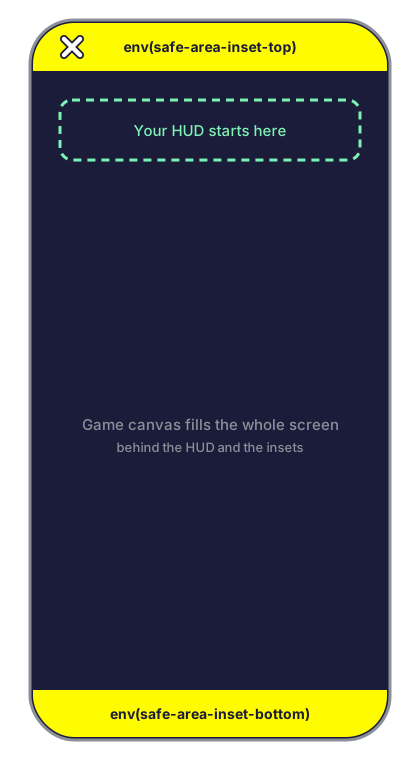
There's no fixed value to design against. The inset varies with the device and with Snapchat's own layout, so don't write a fixed number into your CSS and don't clamp the reported value to a guess. Route the insets through custom properties and apply them on every edge of your HUD:
:root {
  --inset-top: env(safe-area-inset-top, 0px);
  --inset-right: env(safe-area-inset-right, 0px);
  --inset-bottom: env(safe-area-inset-bottom, 0px);
  --inset-left: env(safe-area-inset-left, 0px);
}

.hud {
  position: fixed;
  inset: 0;
  padding: var(--inset-top) var(--inset-right) var(--inset-bottom)
    var(--inset-left);
}
This requires viewport-fit=cover in the viewport meta tag. Without it, the insets read as 0.
One CSS detail costs time. Padding on a positioned ancestor doesn't move absolutely positioned children, because their containing block is the ancestor's padding box. If your score or timer uses position: absolute, put the env() offset on that element itself.
Budget for a HUD that starts well down the screen. If you need the space back, move out of the corner Snapchat occupies rather than shrinking the inset.
Testing without Snapchat
You can't open a Web Lens inside Snapchat until it passes review, and a phone browser only reports its own notch, so the Snapchat-sized inset never shows up during development. Simulate it instead. In a development-only style sheet, override the top inset with a generous value and check that nothing important disappears or overlaps:
/* Development only: simulate Snapchat's controls. */
:root {
  --inset-top: 120px;
}
If the HUD survives that, it survives whatever the real inset turns out to be. Build your first Web Lens covers testing the build on a phone.
Refresh rate
Snapchat runs on phones with 120 Hz displays, and the webview's requestAnimationFrame runs at the display rate. A simulation that assumes 60 frames per second runs twice as fast on those phones. A fixed 60 Hz step that renders without interpolation judders visibly.
Either scale all motion by the frame's elapsed time, or run gameplay on a fixed timestep and interpolate the rendered position between steps. In both cases, clamp the elapsed time so a long pause doesn't produce a burst of catch-up steps.
Pointer input
Input is one thumb on a touchscreen. Use pointer events rather than mouse events, and stop the browser from claiming gestures:
html,
body {
  touch-action: none;
  overscroll-behavior: none;
}
Also suppress the context menu, which fires on touch & hold:
window.addEventListener('contextmenu', (event) => event.preventDefault());
Normalize drag distances by window.innerWidth so controls feel the same on every screen size.
Haptics
On Android, navigator.vibrate works, but calling it before the first user gesture logs an error on every call. iOS has no web vibration API, so the same code is a no-op there. Guard it:
function buzz(milliseconds) {
  if (navigator.userActivation?.hasBeenActive && navigator.vibrate) {
    navigator.vibrate(milliseconds);
  }
}
Audio
Audio can't start before a user gesture. Create your AudioContext, or start the engine's sound system, inside the first tap handler, and resume it there if it's suspended.
Snapchat can send the webview to the background without unloading it, for example when a Snap arrives. Pause the game and suspend audio on visibilitychange, and resume on return:
document.addEventListener('visibilitychange', () => {
  if (document.hidden) {
    audioContext.suspend();
    game.pause();
  } else {
    audioContext.resume();
    game.resume();
  }
});
Reset your fixed-timestep accumulator here too, or the first frame back runs every step it missed.
Storage
Each launch of a Web Lens runs in a fresh, isolated browsing store, and Snapchat discards that store when the Lens closes. localStorage, IndexedDB, and cookies all work within a session but start empty on the next launch. Use them for in-session state only.
To keep progress, settings, or a best score between launches, use storage from the Web Lens API. Check that it's supported, and keep the game playable without it.
Loading
Snapchatters decide within seconds, so time to first play matters more than any other performance metric.
- Keep the zip small. Platform requirements lists the cheap wins.
- Use stable asset filenames and add
<link rel="preload">tags for your mesh and audio files, so everything downloads in one parallel burst. - Set the page background in
index.htmlto match your scene's clear color, so the first paint isn't a white flash. - Generate at boot only what the first screen needs. A few hundred milliseconds of texture generation on a desktop is seconds of blocked main thread on a phone.