Multiplayer Games
Multiplayer is a live format where Snapchatters play together in the same Lens session in real time. Players join a session with friends in a Chat, or with other online players through matchmaking. Gameplay state is shared across the session—every player sees the same match as it happens. Multiplayer games are built on the Connected Framework, the kit that handles sessions, matchmaking, and state synchronization.
How a match flows
Multiplayer games run in two formats:
- Chat: opening the Lens from a Chat creates an instant session that the friends in that conversation can join.
- Matchmaking: opening the Lens from the Camera Carousel or the Games Explorer—the games inventory, opened by tapping the games icon in the bottom left of the Main Camera—searches for other online players to fill the session.
Either way, every participant lands in the same shared session. Represent players however fits your game—showing them as their Bitmoji makes the match instantly personal. Gameplay state syncs live between all participants: positions, scores, and events update for everyone as they happen.
The Chat Multiplayer experience
What a player sees when a game starts from a conversation:
- Open a Chat. The user opens a Chat with a friend or a group.
- Open the Chat Drawer. They tap the games icon to open the Chat Drawer and select a Multiplayer game.
- Send an invite. The Lens prompts the player to send an invite to the friends in the Chat. Accepting sends the invite into the conversation.
- Friends join when they want. The player can start playing right away, and friends can join the session at any point from the invite.
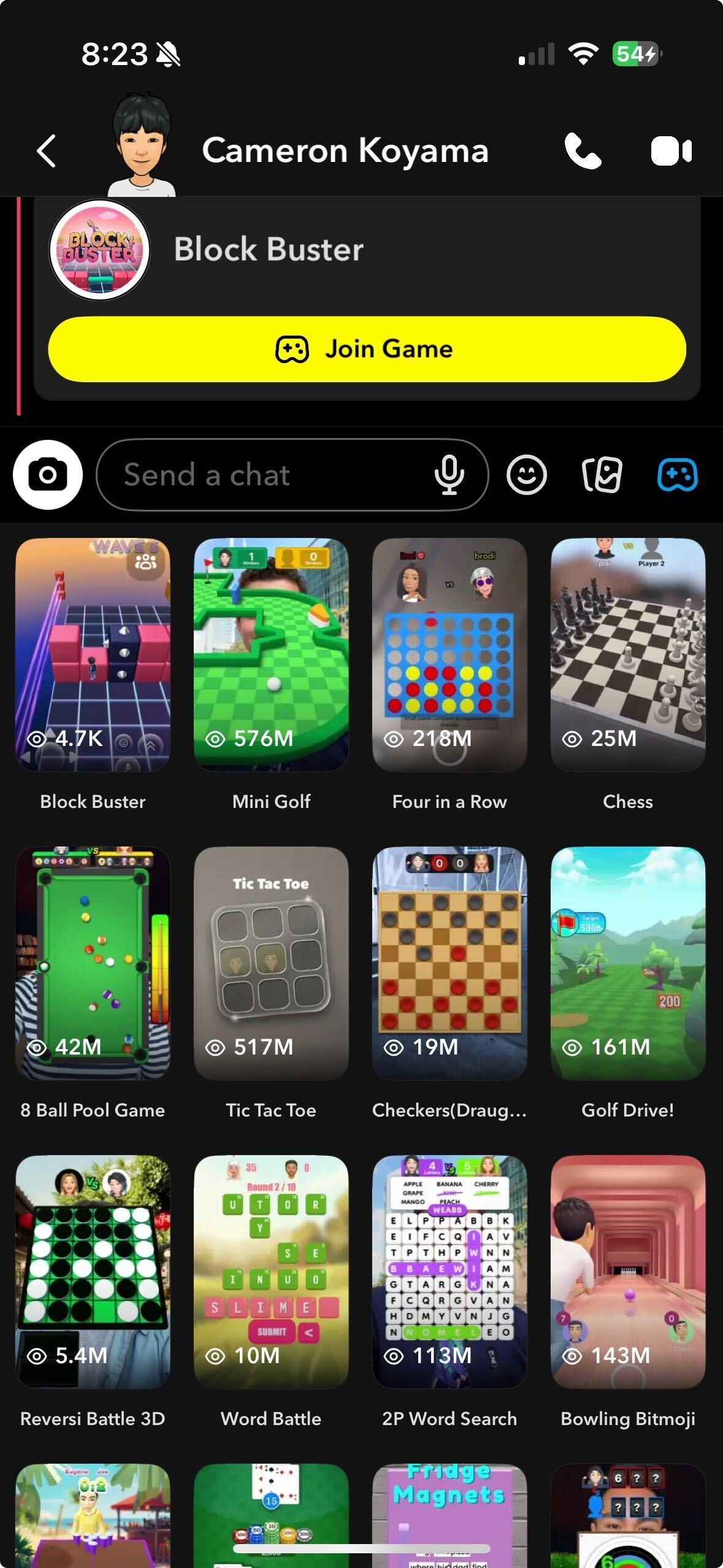
The Chat Drawer inventory: tapping the games icon next to the chat bar opens the grid of games to pick from, and a sent invite appears in the conversation as a Join Game card.
The Matchmaking experience
What a player sees when a game starts from the Camera Carousel or Games Explorer:
- Open the Lens. The user opens the Lens from the Camera Carousel or Games Explorer.
- Join matchmaking. The Lens prompts the player to join matchmaking, and accepting begins the search.
- The session forms. If other players are also searching and the minimum or target player count is reached, a session begins.
- The session is fixed. Once formed, no new players can join the session. Players may leave during the match, but empty spots don't refill.
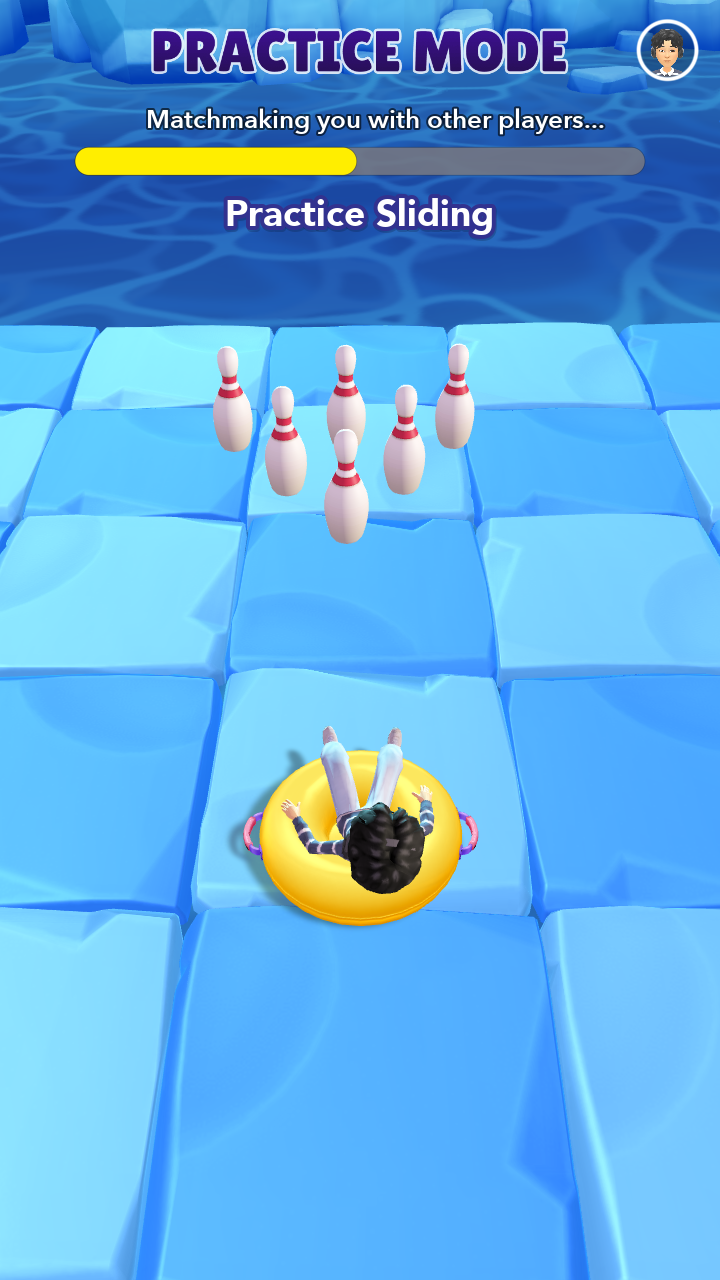
Matchmaking in progress: the search bar fills at the top while the player warms up in Practice Mode.
Designing for each format
The two formats have opposite joining behavior, and your game design needs to handle each:
- Chat sessions are open. Friends can join at any point, so your Lens should manage how a player entering mid-session lands in the game—for example, joining the next round or entering as a spectator until the current round ends. The format suits experiences players can drop in and out of, such as hangout spaces, sandbox games, and ongoing competitions between friends.
- Matchmaking sessions are fixed. The session only shrinks as players leave, so handle departures gracefully, and push players back into matchmaking once a match completes to fill the empty spots. The format suits quick, round-based party games and matches with a clear start and finish.
Optimize for the Camera Carousel and Games Explorer first—that's where Snapchatters discover your game—with optional support for the Chat Drawer on top.
Why the format works on Snapchat
- Matchmaking is built in. The platform fills your session with other online Snapchatters—no lobby codes, accounts, or server setup.
- Personal by default. Bitmoji avatars put recognizable versions of each player into the match.
The format fits head-to-head arcade games, party games, racers, and any idea where the fun comes from reacting to another player live.
Try Multiplayer games
Scan a Snapcode with Snapchat to try a live Multiplayer game:
 |  |  |  |  |  |  |
|---|---|---|---|---|---|---|
| Bitmoji FC | Color Match | Gum Run | Hoop Hustle | Lucky Path | Sling Slide | Tumbling Tiles |
Build a Multiplayer game
Start with the Multiplayer Game Starter Project, a complete networked game you can reskin, or build from scratch on the Connected Framework.
- Connected Framework—the multiplayer kit for game Lenses: sessions, synced entities, and player instantiation.
- Multiplayer Game Starter Project—a playable race with matchmaking, spectator mode, and a results screen.
- Connected Lenses Overview—the foundation for shared Lens sessions and real-time state.
- Sharing Data—sync gameplay state between participants.