Multiplayer Best Practices
Guidance drawn from shipping multiplayer game Lenses on the Connected Framework. Most of it exists because something broke: the session lifecycle and the search-again loop are where the bugs actually come from.
For general games guidance that is not multiplayer-specific, see Best Practices for Games.
Understand the session flow
A multiplayer Lens cycles through these states. The loop on the right is the source of many bugs: every time the Lens searches again, the whole scene has to return to a perfectly clean state.
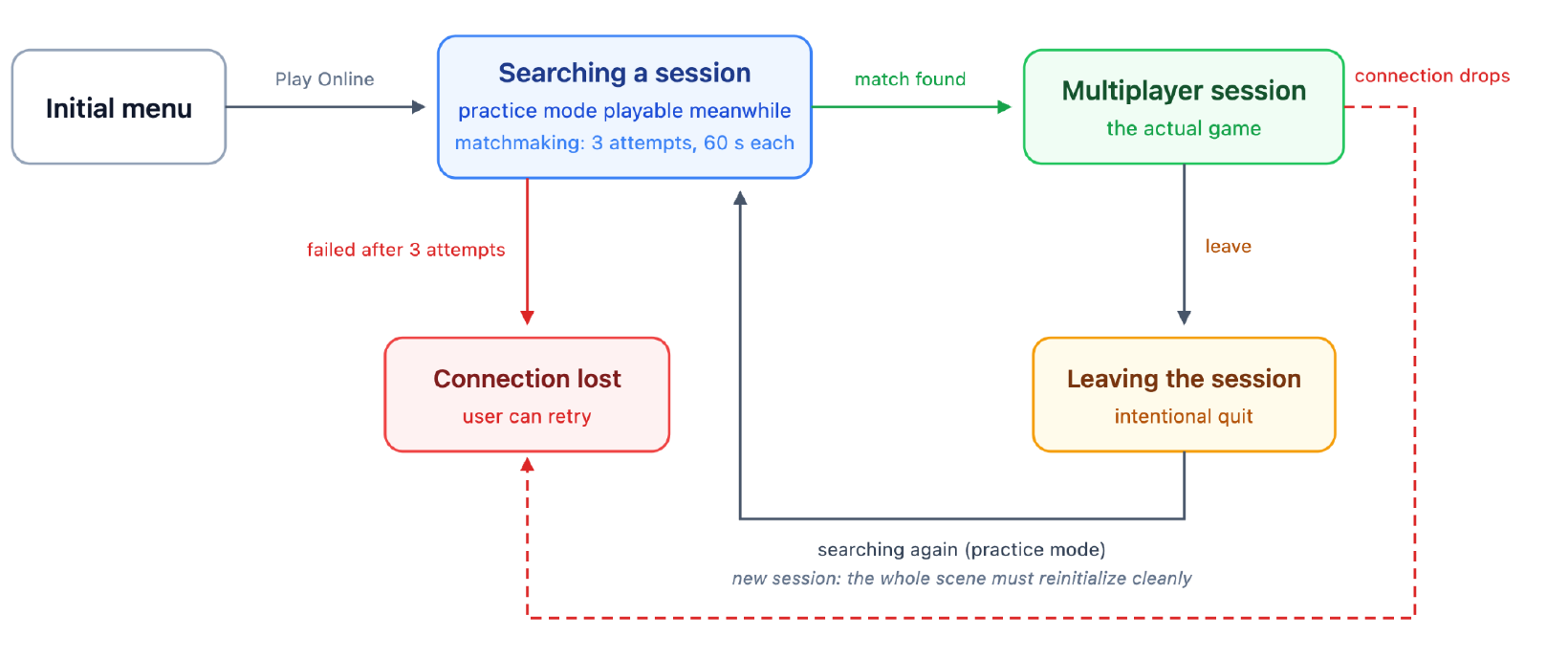
To make a clean state achievable, instantiate game objects from prefabs that can be destroyed when the game state ends. See Destroy and re-create instead of reinitializing.
Connected does not mean ready
This is the single most common source of race conditions. onConnected means
the network link is up, not that shared state is usable. The session store
and session-scoped stores are still syncing at that point, and reading or
writing them causes race conditions.
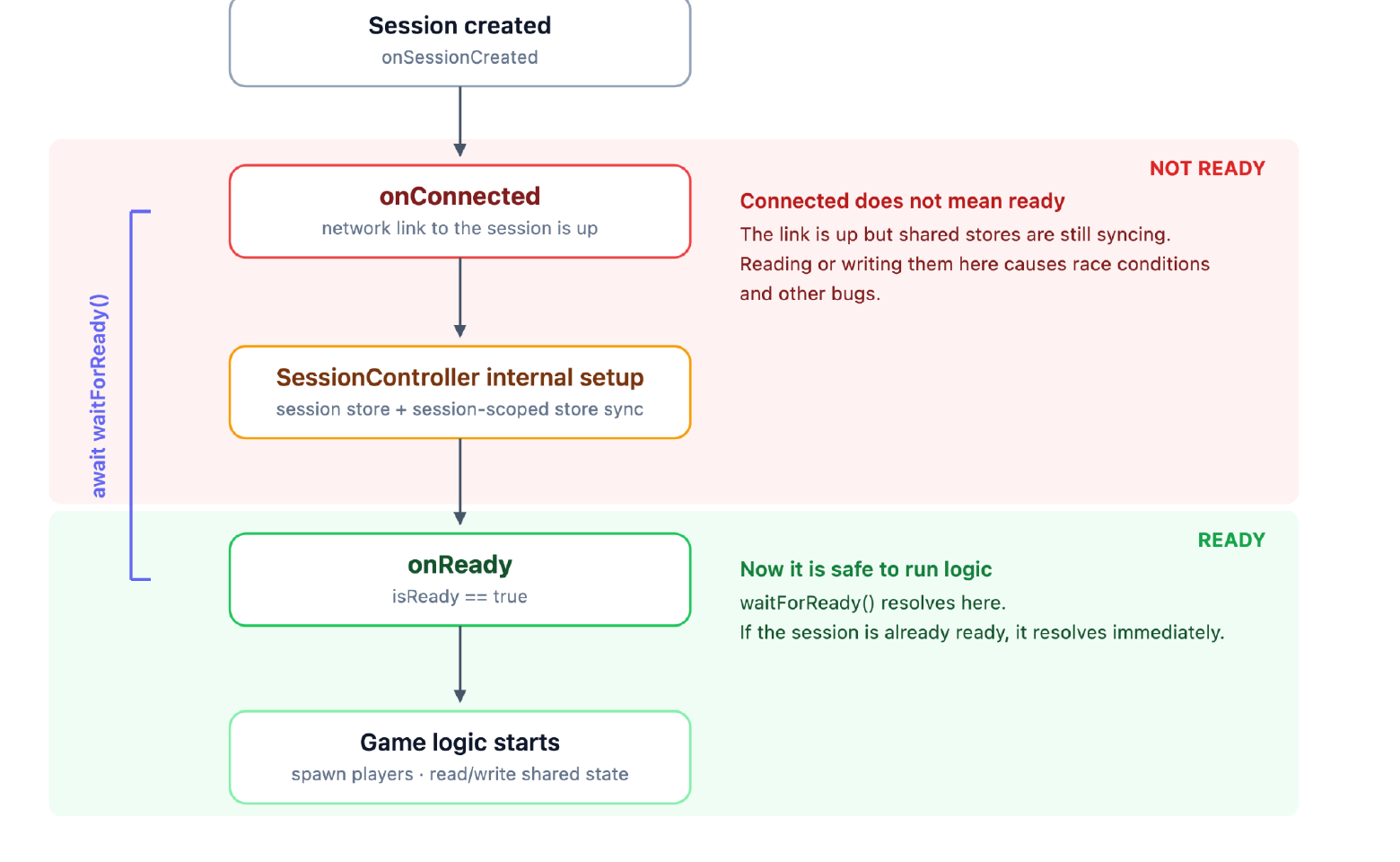
Gate every piece of game logic on readiness, using
waitForReady() or getIsReady():
import { SessionController } from 'ConnectedFramework.lspkg/Core/SessionController';

@component
export class GameStart extends BaseScriptComponent {
  onAwake() {
    this.createEvent('OnStartEvent').bind(() =>
      this.onStart().catch(console.error)
    );
  }

  private async onStart() {
    await SessionController.getInstance().waitForReady();
    if (isNull(this)) return;

    // The session is ready. Sync Entities still finish their own setup.
  }
}
waitForReady() resolves immediately if the session is already ready, so it is
safe to await unconditionally rather than branching on getIsReady() first.
Session readiness is not entity readiness. Each
Sync Entity finishes its own setup after the session
becomes ready, so wait on the entity as well—await syncEntity.waitForReady()
or its onSetupFinished event—before reading or writing that entity's state,
and gate spawning on the Instantiator's own isReady() /
waitForReady().
Destroy and re-create instead of reinitializing
Where possible, put game logic and stateful scene objects in a prefab, especially scripts that use Sync Entity. Then destroy the whole prefab when the state changes, such as when the user disconnects, and instantiate it again with a clean state when entering the playing state.
Many of the bugs found so far were caused by scripts holding old state from practice mode or a previous session. It shows up worst when a player disconnects and searches for a new match.
Static scene objects are fine to leave in the hierarchy. Use a prefab for logic and synchronized objects wherever you can, as long as instantiation does not become a performance problem during gameplay.
Three habits make this reliable:
Register an OnDestroy callback to remove event callbacks, and use
DestructionHelper to track everything that needs unregistering or destroying.
Check isNull(this) after every await. The component may have been
destroyed while the promise was pending.
import { DestructionHelper } from 'CoreExtensions.lspkg/Scene/DestructionHelper';
import { SessionController } from 'ConnectedFramework.lspkg/Core/SessionController';

@component
export class Spawner extends BaseScriptComponent {
  private readonly destructionHelper = new DestructionHelper();

  onAwake() {
    this.createEvent('OnDestroyEvent').bind(() => {
      this.destructionHelper.destroy();
    });

    this.createEvent('OnStartEvent').bind(() =>
      this.onStart().catch(console.error)
    );
  }

  private async onStart() {
    await SessionController.getInstance().waitForReady();
    if (isNull(this)) return;

    const instantiatedObject = this.spawn();
    this.destructionHelper.markForDestroy(instantiatedObject);
  }
}
Prefer a prefab over a reset method. A reset method has to remember every field; destroying the prefab cannot forget one.
Always handle asynchronous code
When a bug happens on device, logs are the only way to find the root cause. An unhandled promise rejection produces no log at all, which makes the failure invisible.
Every async call must either be awaited or given a .catch():
// this.onStart is async
this.createEvent('OnStartEvent').bind(() =>
  this.onStart().catch(console.error)
);

// this.respawn is async
this.respawn()
  .then(() => {
    // ...
  })
  .catch(console.error);

// forceEndLevel() returns a Promise
try {
  await this.finishChecker.forceEndLevel();
} catch (error) {
  console.error(error);
}
If a failure is fatal, use failAsync to raise a Lens exception rather than
swallowing it. This is the async equivalent of throwing without a try-catch:
// restart should never fail. If it does, make sure it surfaces.
this.restart().catch(failAsync);
Add logs where you expect an error might occur, and always log inside
catch blocks.
Testing
Test every entry point
Pushing your Lens to a device adds it to the Camera Carousel, Chat Drawer, and Games Explorer, so you can test how your Lens functions from each entry point. Optimize for the Camera Carousel and Games Explorer first, with optional support for the Chat Drawer.
Test more than one player in the editor
Open a second Preview panel. Each panel connects as its own participant, which is enough to reach a minimum of two players. Add more panels to fill the lobby.
Test the edge cases
These are the ones that break in production:
- Disable the internet connection during each different game state, not just at the menu.
- Host migration. If any realtime store is owned during gameplay, test what happens when the store owner leaves the game, in each game state.
Structure the code
Use a state machine, not boolean flags. Multiple booleans drift out of sync with each other. A state machine also gives each state a place to initialize and clean up, through dedicated start and stop methods.
Do not keep two implementations of the same concept. If the project already
has a state machine, extend it rather than adding a parallel one for
transitions such as moving from the game screen to the results screen, or
restarting the session search. The
starter project uses GameManager and
its states for exactly this reason.
Pass objects as script inputs rather than parsing the scene. If an object is created at runtime, store the reference and clear it when the object is destroyed. Searching the hierarchy by name is fragile and breaks when the prefab-based approach above changes what exists at edit time.
Keep each class to a single responsibility, and split it once it starts collecting unrelated concerns or grows too large. Large multi-purpose files are harder to reason about, which matters more than usual when state is shared across clients.
Extract shared logic instead of duplicating it, and remove unused code rather than leaving it to confuse the next reader.
Related
- Connected Framework overview
- Session Controller:
waitForReady()and the session events. - Multiplayer Game Starter Project: these practices applied.
- Best Practices for Games: general, non-multiplayer guidance.