Manipulation
Introduction
This guide will walk you through how to add interactive manipulation to objects in your Lenses with the Manipulate component. The Manipulate component allows users to scale, rotate, and translate 3D objects using intuitive hand gestures.
Related Documentation
This guide touches on concepts covered in the following guides:
Project Setup
To follow this guide, you'll need a Surface Lens with a 3D object.
Add the Interaction Component
First, we need to add a Interaction Component to the 3D object. This will allow the object to receive Touch events when a user touches the object on screen while playing with the Lens.
Select the 3D object you want to manipulate.
In the Inspector panel, select Add Component.
From the dropdown, select Interaction.
Configure the Interaction Component
The Interaction Component requires a reference to a Mesh Visual to define the onscreen touch area for interaction. We can add it as follows:
With the 3D object selected, select Choose Mesh Visual on the Interaction Component.

In the popup dialog that opens, select the Mesh Visual Component associated with your 3D object.
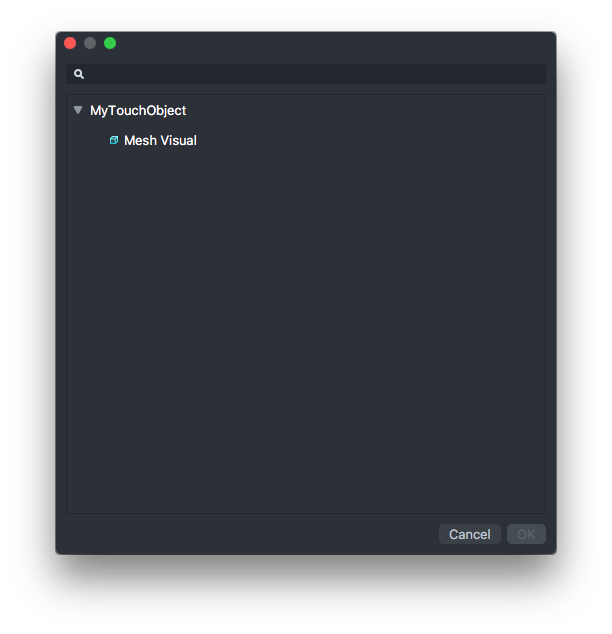
Select OK.
Add the Manipulate Component
With the Interaction Component added to the 3D object, we can add the Manipulate Component.
Select the 3D Object.
In the Inspector panel, select Add Component -> Manipulate.
Customizing the Interaction
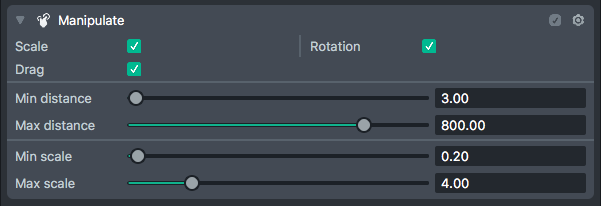
The Manipulate Component's Inspector exposes properties you can tune to customize interaction with the object.
Scale
Uniformly scale the object using a pinch gesture.
Rotation
Rotate the object around the world Y-axis using a two-finger rotation gesture.
Drag
Move the 3D object around with a single-finger drag.
Min Distance
The minimum distance from the camera the object is allowed to be while dragging.
Max Distance
The maximum distance from the camera the object is allowed to be while dragging.
Min Scale
The minimum uniform scale the object is allowed to be while scaling.
Max Scale
The maximum uniform scale the object is allowed to be while scaling.