Transparent Permission
Transparent Permission allows published Lenses to combine internet connectivity with sensitive user data (camera, microphone, or location) while maintaining user privacy through explicit disclosure.
When a Lens with Transparent Permission launches, two things happen:
- Permission prompt: A dialog appears listing which sensitive data the Lens will access
- LED indicator: If granted, the device's LED blinks while sensitive data is being captured
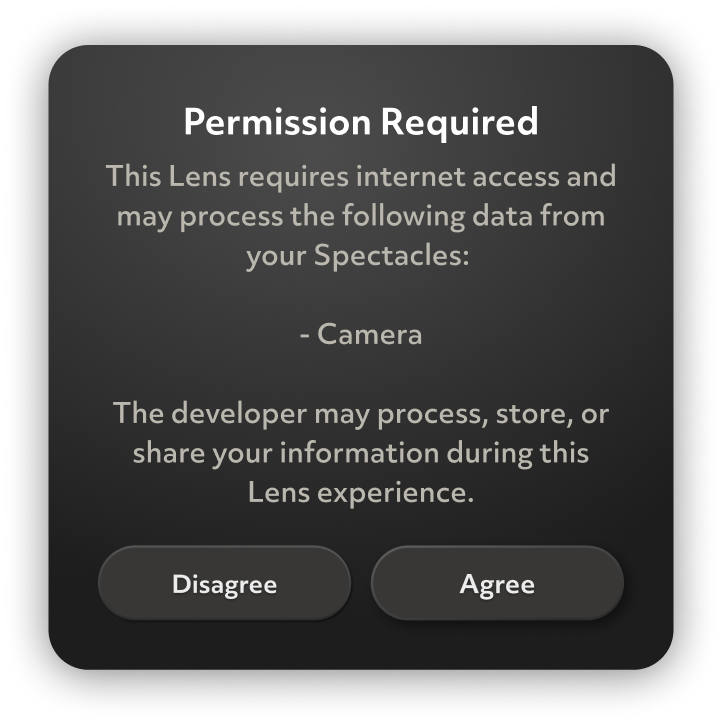
Spectacles prioritizes user privacy by default. Previously, Lenses could not combine external connectivity (internet or Bluetooth) with sensitive data access. Transparent Permission enables this combination by ensuring users explicit awareness.
This design ensures users maintain control and awareness of their data, particularly when using internet-connected Lenses.
Lenses that use Experimental APIs still cannot be published to a wider audience.
Compatibility
Not all permission combinations are compatible with Transparent Permission. The following combinations are supported:
| Permission Combinations | Examples |
|---|---|
| Internet Descriptor + Connectivity type + Sensitive Sensor | Internet Module + SpectaclesSyncKit + ASR Module |
| SupabaseModule + SpectaclesSyncKit + DialogModule | |
| Internet Descriptor + Sensitive Sensor | Remote Service Gateway + Camera Module |
| Web Socket + ASR Module | |
| Remote Service Module + RawLocationModule |
If a Lens is using the following unsupported permission combinations, it will not be eligible for publication. However, please refer to the workaround below.
| Permission Combinations | Examples | Workaround |
|---|---|---|
| Connectivity type + Sensitive Sensor | SpectaclesSyncKit + ASR Module | This combination cannot be published. However, adding Internet Module to the Lens will meet the requirement and the Lens will be publishable |
Module to Descriptor Mapping
| Internet Modules | Descriptors Applied |
|---|---|
| InternetModule | Internet |
| SupabaseModule | Managed Backend, Internet |
| SpecsMobileKitModule | SpectaclesKitModule, Internet |
| Connectivity type Modules | Descriptors Applied |
|---|---|
| ConnectedLensModule | Remote Connected Lenses, Colocated Connected Lenses |
| RemoteServiceModule | Remote API |
| BluetoothCentralModule | Bluetooth Peripheral |
| Sensitive Sensor Modules | Descriptors Applied |
|---|---|
| CameraModule | Camera |
| AsrModule | Microphone |
| DialogModule | Speech to Text |
| AudioTrackAsset w/ MicrophoneAudioProvider | Microphone- SnapML |
| RawLocationModule | GPS - Precise |
| ProcessedLocationModule | Location - Coarse |
Extended Permissions
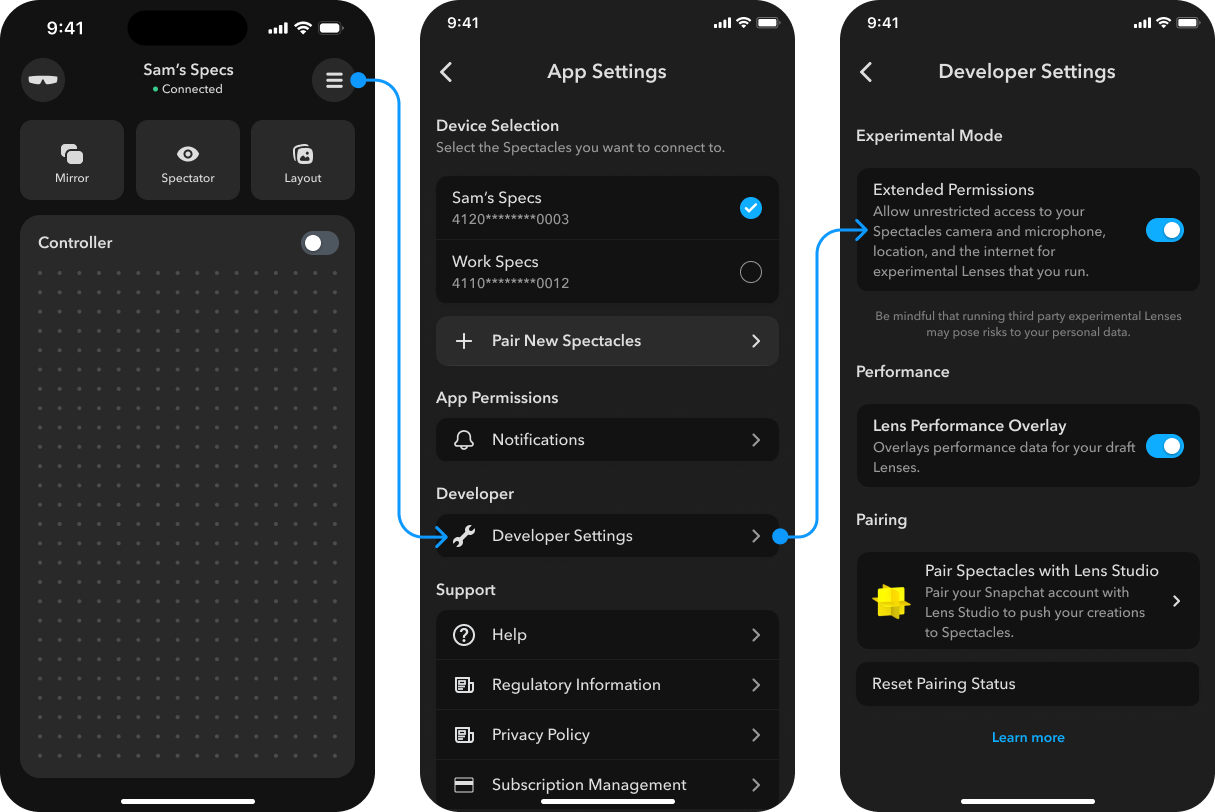
Extended Permissions is a user-controlled setting that bypasses Transparent Permission prompts by granting permissions by default. Users with Extended Permissions enabled will not see prompts when launching these Lenses.
Users can enable Extended Permissions in the Spectacles app when they:
- Trust the developer or Lens source
- Want to avoid repeated prompts for frequently-used Lenses
- Understand the privacy implications