Creator Audience Targeting
Target a creator's followers and engagers with your ads—without requiring the creator to post content.
Overview
User Story: "I want to show my ads specifically to people who follow this Creator, or people who look like them."
Creator Audience Targeting lets you build audiences based on a creator's followers and engagers, then use those audiences for ad targeting. This requires an AD_LEVEL partnership but does not require the creator to post anything—just their initial approval.
Before following this guide, you must establish an AD_LEVEL partnership with creators. See Partnership Setup for the complete invitation and approval process.
Use Cases
Sponsor a Creator's Audience
Run your brand ads directly to users who already follow a creator in your industry—high relevance, proven interest.
Conquest Competitor Fans
Target followers of creators who work with competing brands to introduce your alternatives.
Amplify Partnership Campaigns
When running Ad Partnerships, also target the creator's existing audience for maximum impact.
Test Influencer Fit
Before committing to a full partnership, test ad performance with a creator's audience to validate alignment.
Workflow Summary
Key Details
Audience Types Available
| Audience Type | Description | Creator Action Required |
|---|---|---|
| Subscribers | Users who follow/subscribe to the creator's Public Profile | Initial approval only |
| Engagers | Users who viewed, interacted with, or engaged with the creator's content | Initial approval only |
| Lookalikes | Users similar to the creator's subscribers or engagers | Initial approval only |
Permission Requirements
BRAND_LEVEL partnerships do not grant audience targeting permissions. You must have AD_LEVEL access to create audiences from a creator's profile.
| Permission Level | Can Target Creator's Audience? | Where to Set Up |
|---|---|---|
BRAND_LEVEL | No | Not supported |
AD_LEVEL | Yes | Partnership Setup |
Audience Sizing Considerations
| Factor | Impact on Size |
|---|---|
| Creator follower count | Larger creators = larger subscriber audiences |
| Retention window | Longer windows = larger engager audiences |
| Lookalike type | REACH > BALANCE > SIMILARITY |
| Geographic targeting | Country restrictions reduce available audience |
Minimum Audience Sizes
Audiences must meet minimum size thresholds for targeting:
| Audience Type | Minimum Size |
|---|---|
| Direct segments | 1,000 users |
| Lookalike seeds | 1,000 users |
If a creator's audience is too small for direct targeting, consider using it only as a seed for lookalikes, which can expand to much larger sizes.
Best Practices
| Practice | Reason |
|---|---|
| Layer subscribers AND engagers | Captures both loyal fans and casual viewers |
| Use BALANCE lookalikes for campaigns | Best trade-off between quality and scale |
| Refresh audiences periodically | Subscriber/engager bases change over time |
| Combine with contextual targeting | Demographics + creator audience = precision |
| A/B test direct vs. lookalike | Find optimal performance for your goals |
Implementation Tracks
Choose the track that matches how you'll be working:
- Marketing UI — Step-by-step walkthrough using Snapchat Ads Manager. Best for marketers building audiences manually.
- Developer API — Code samples and endpoint references for programmatic audience creation. Best for engineers building automated workflows.
Switch between tracks using the tabs below — Choose Marketing UI for manual workflows or Developer API for automated integrations.
- Marketing Track
- Developer Track
Marketing Track
Complete Partnership Setup — You must have an active AD_LEVEL partnership before proceeding
Step 1: Create Profile Engagement Audience
Build an audience from the creator's subscribers or engagers.
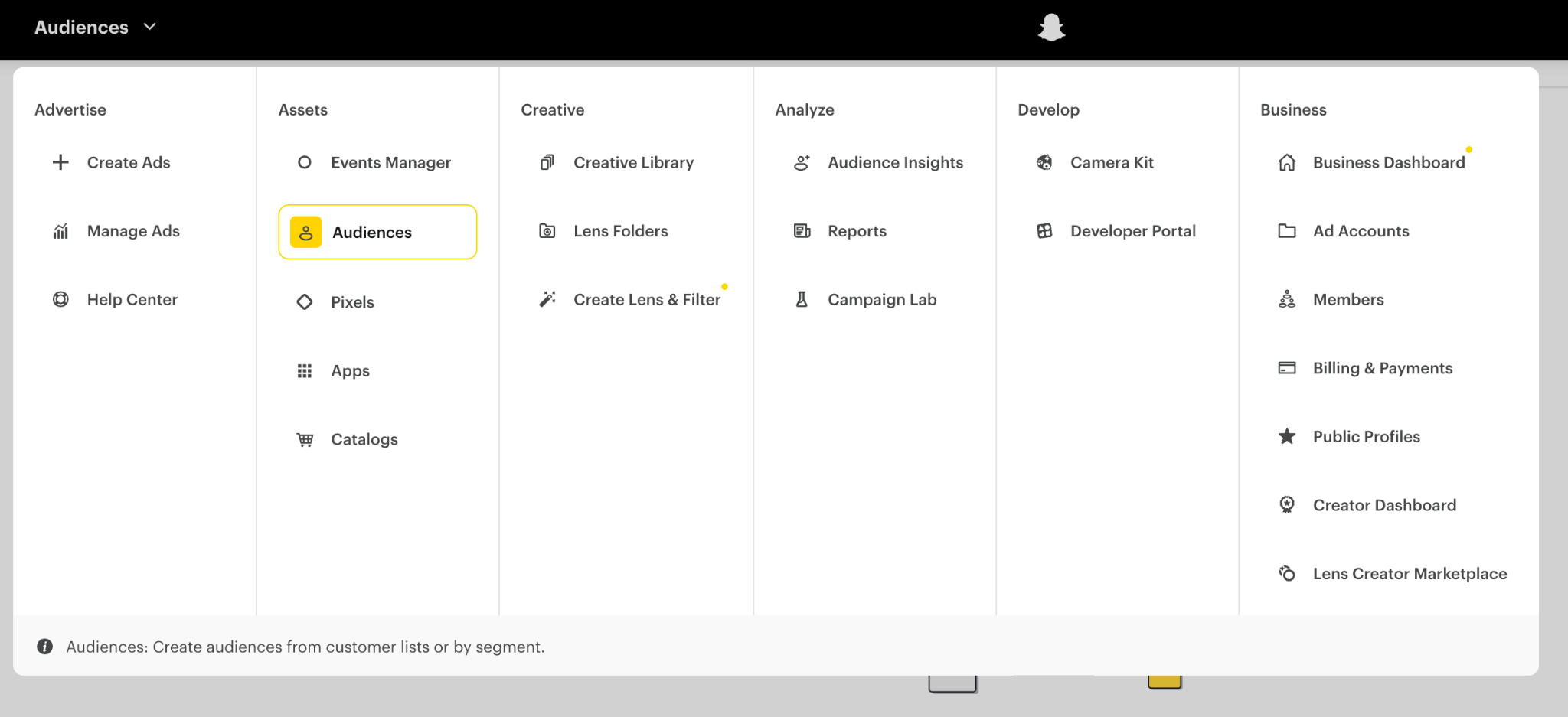
- Navigate to Main Menu → Assets → Audiences
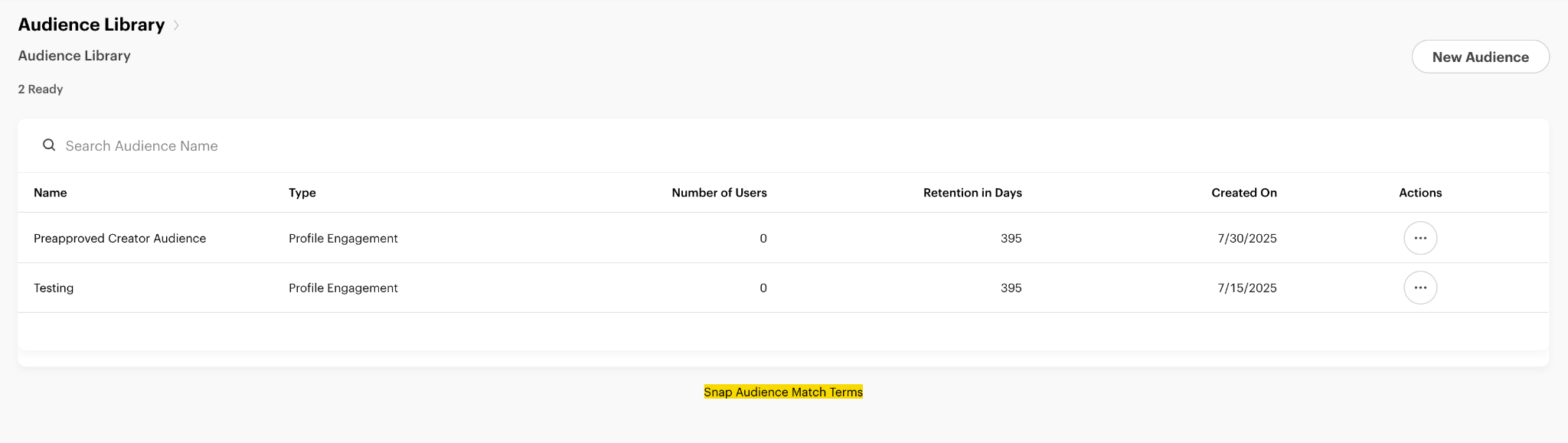
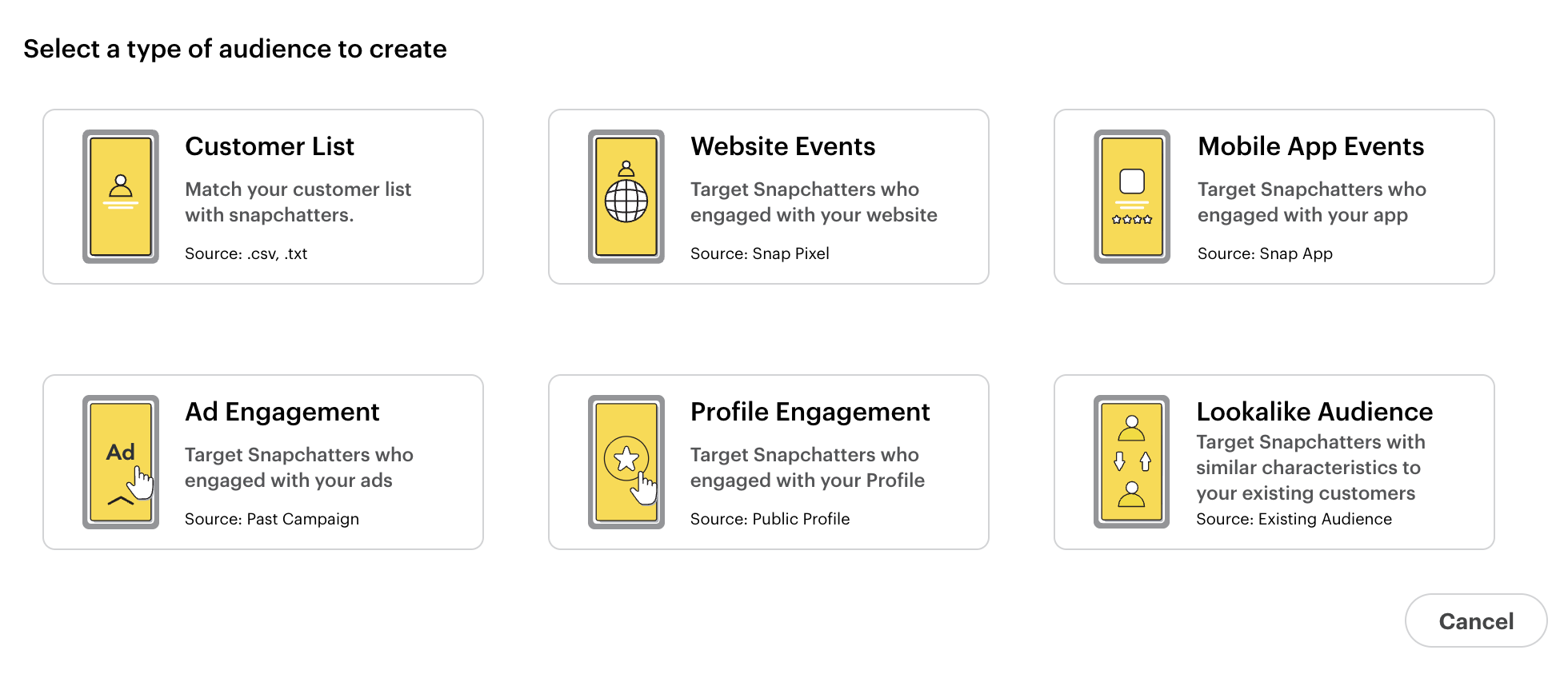
- Click "New Audience"
- Select "Profile Engagement" from the audience type selector
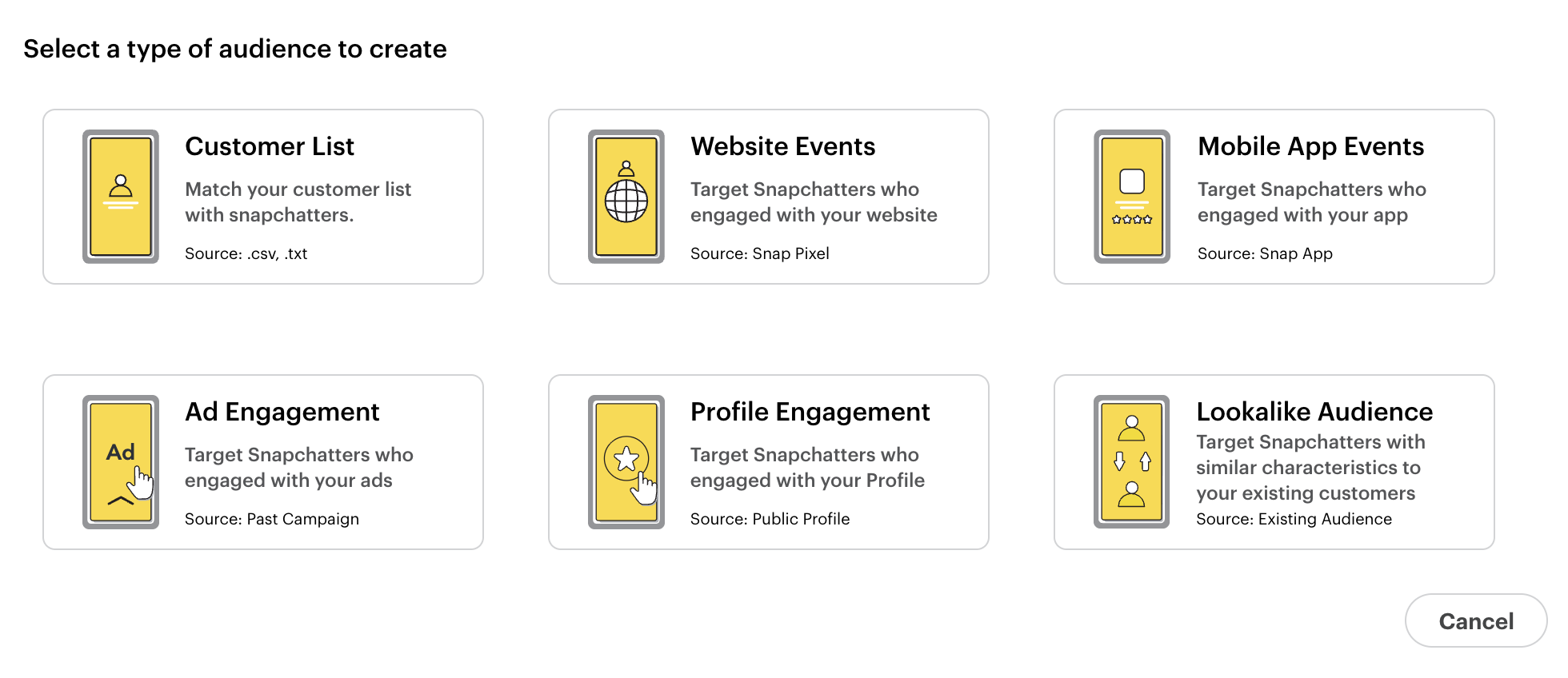
- Configure your audience:
Audience Name: Give your audience a descriptive name (e.g., "Creator X - Subscribers")
Public Profile: Type the creator's name
- Only pre-approved creators (with
AD_LEVELpermission) will appear in the dropdown - If a creator doesn't appear, verify they're added as an Ad Partner in Partnership Setup
Audience Definition: Choose one:
| Option | Description |
|---|---|
| Subscriber to Profile | Targets all of the creator's followers |
| Snapchatters who have done an action | Targets followers who completed a specific action (viewed story, viewed profile, played with lens, etc.) |
Duration: Select how long to keep this audience active (retention window)
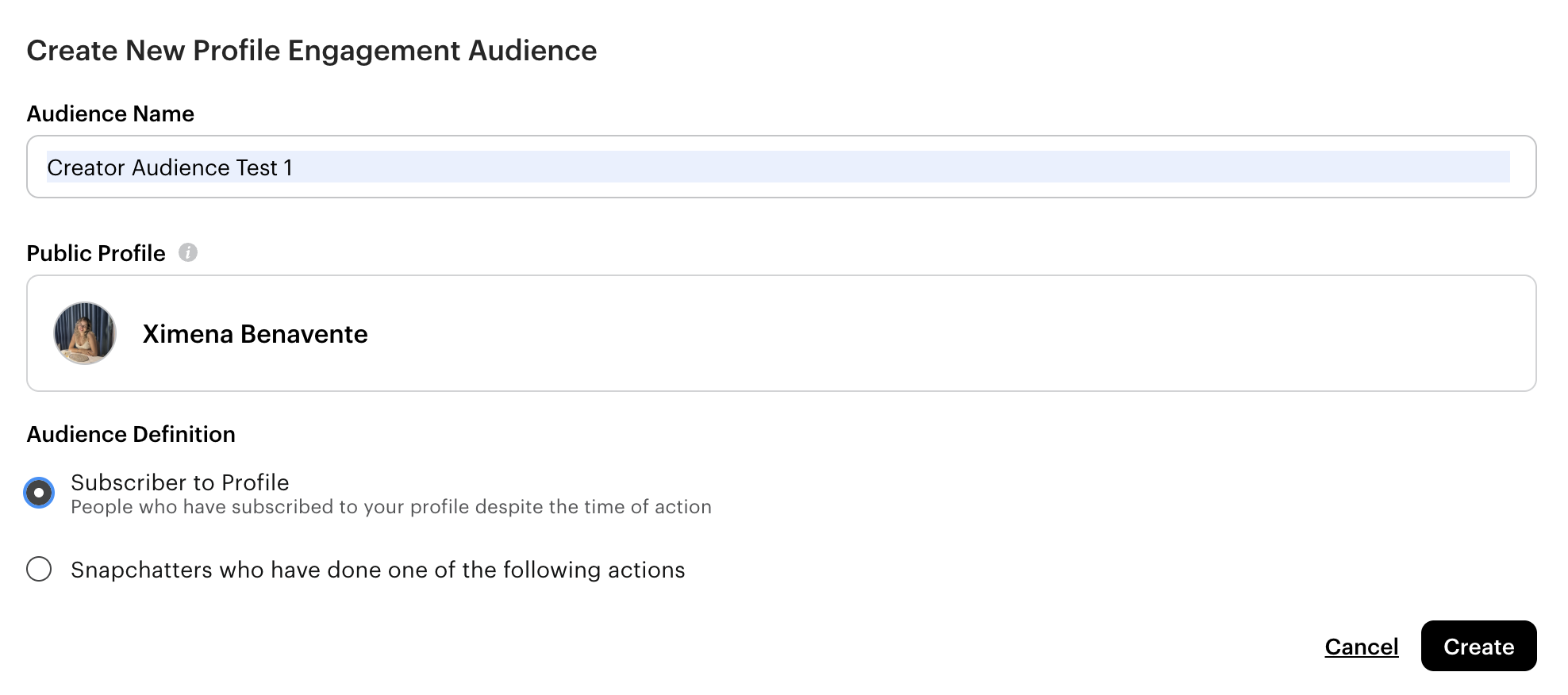
- Click Create — The audience will be available immediately for use in campaigns
Step 2: Create Lookalike Audience (Optional)
Expand your reach by finding users similar to the creator's audience.
- Navigate to Main Menu → Assets → Audiences
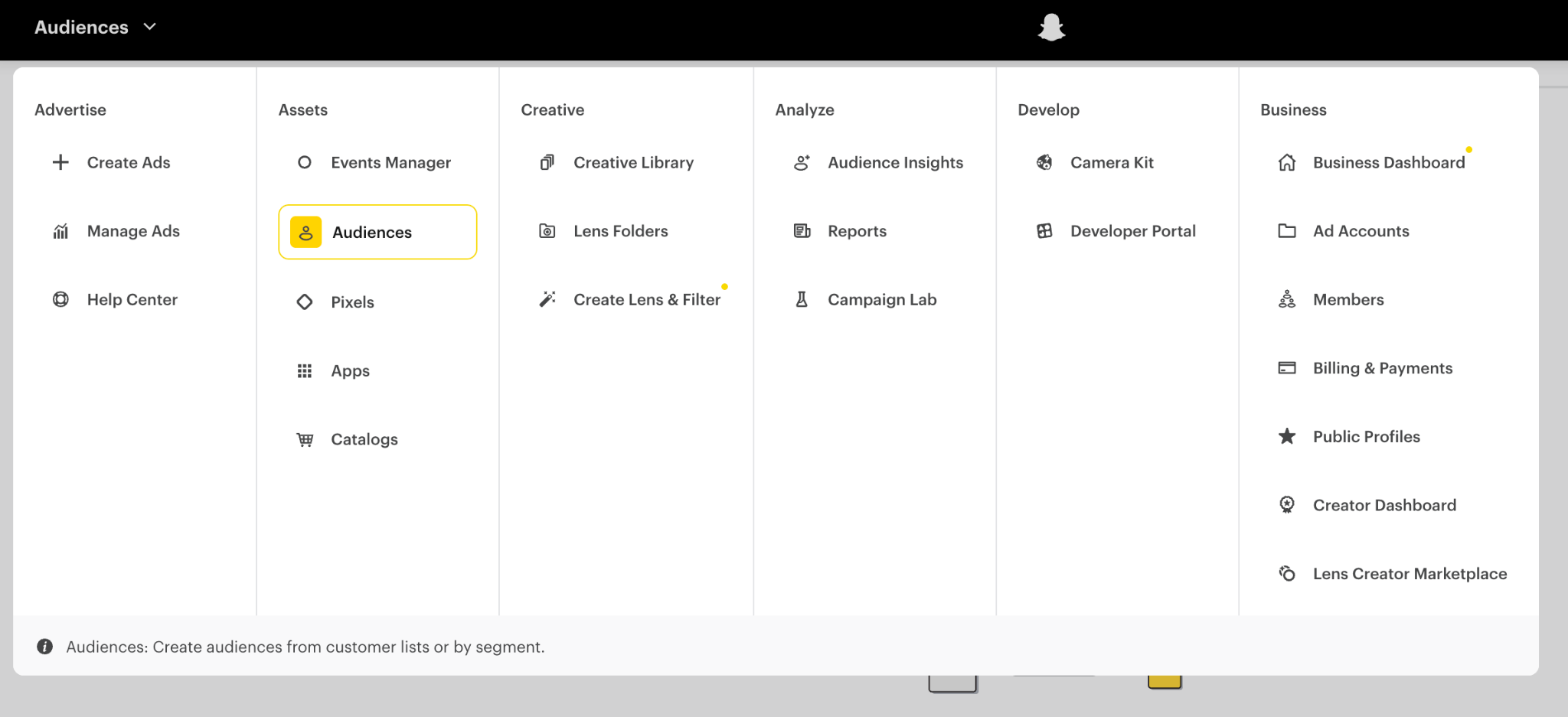
- Click "New Audience"
- Select "Lookalike Audience" from the audience type selector
- Configure your lookalike:
Seed Audience: Select the Profile Engagement audience you created in Step 1
Location: Select the country where you want to target this audience
Lookalike Type: Choose your audience size/quality trade-off:
| Type | Audience Size | Match Quality | Use Case |
|---|---|---|---|
| Similarity | Smallest | Highest | Maximum relevance, limited scale |
| Balance | Medium | Medium | Recommended — Best trade-off |
| Reach | Largest | Lower | Maximum scale, broader targeting |
Audience Name: Give your lookalike a descriptive name
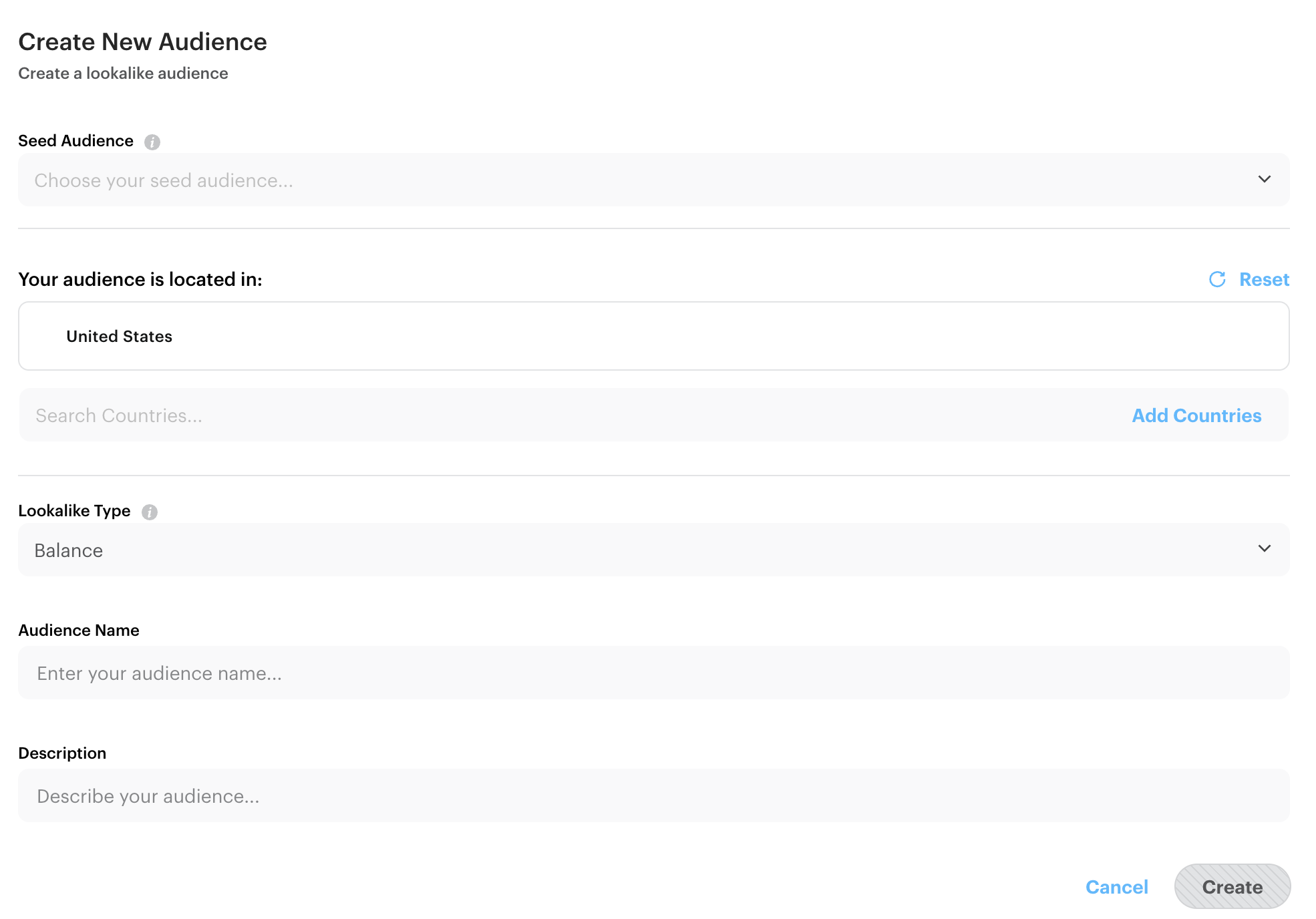
- Click Create — Lookalike audiences take time to process (typically a few hours)
Step 3: Apply Audiences to Campaign
Use your creator audiences when setting up ad campaigns.
- Navigate to Advertise → Create Ads
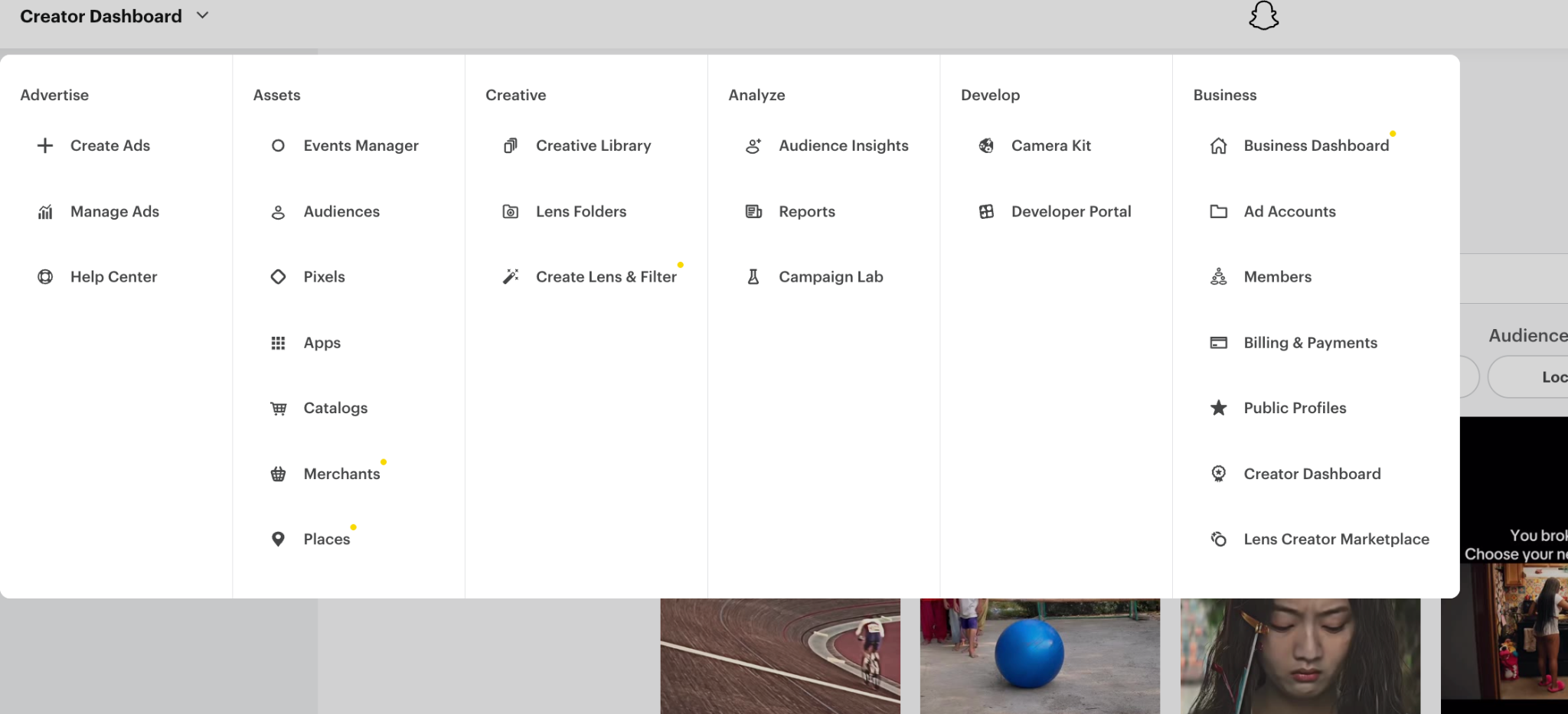
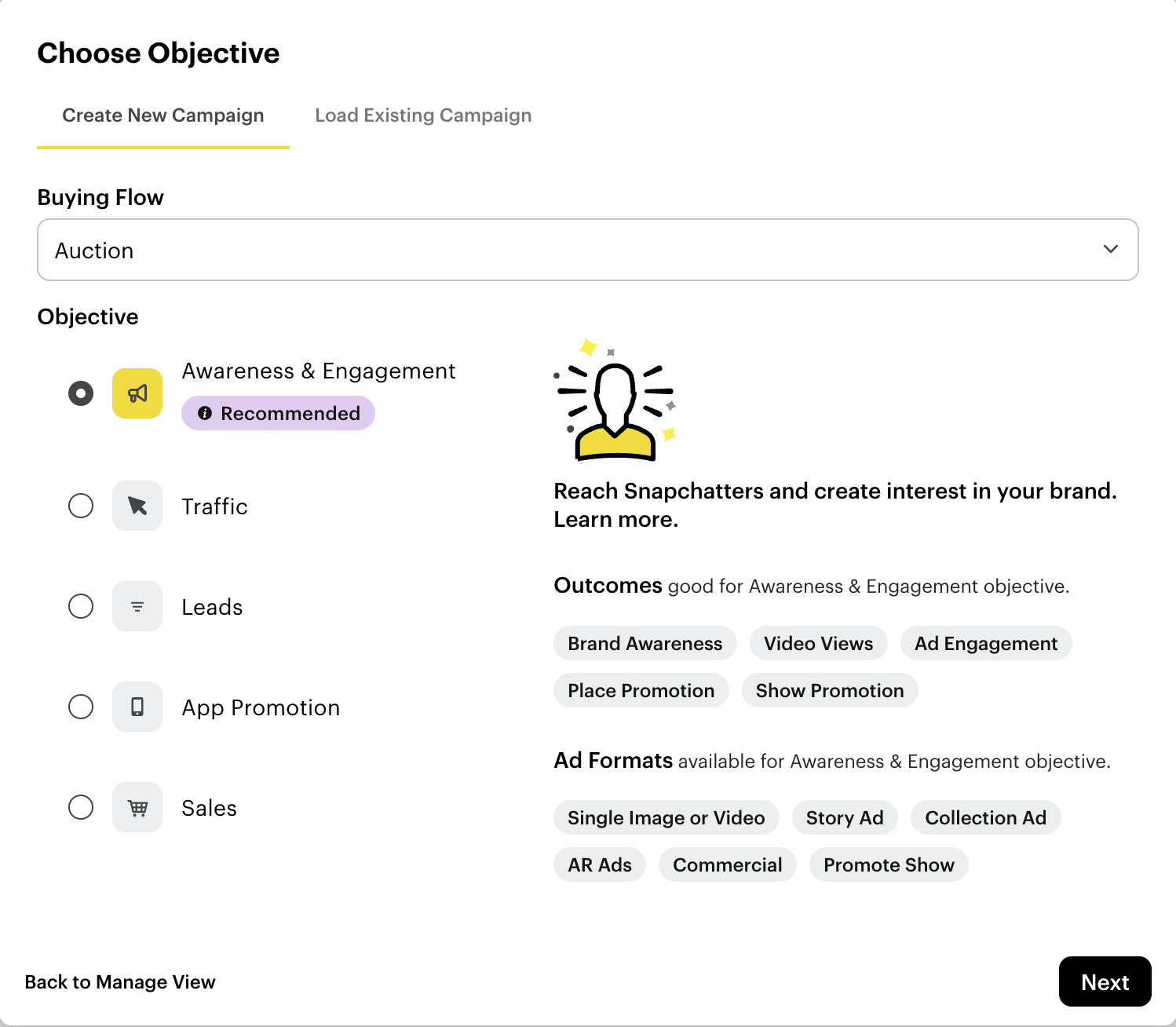
- Select your campaign objective
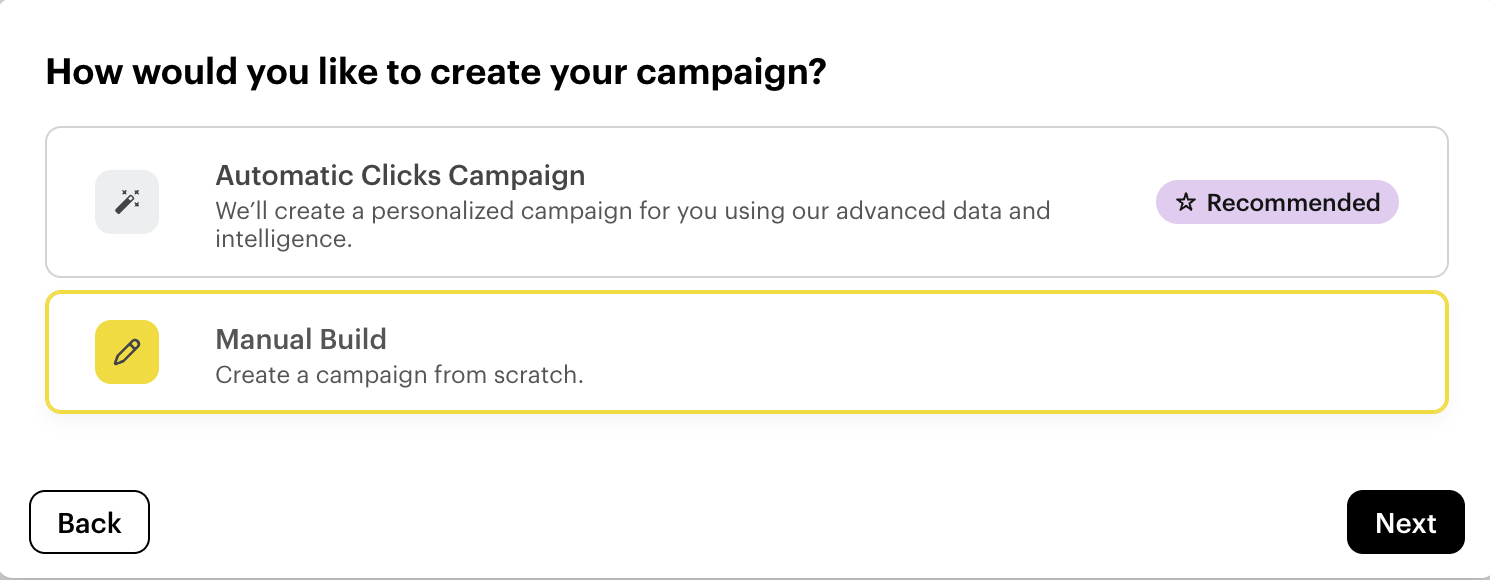
- Choose Manual Build (required for custom audience targeting)
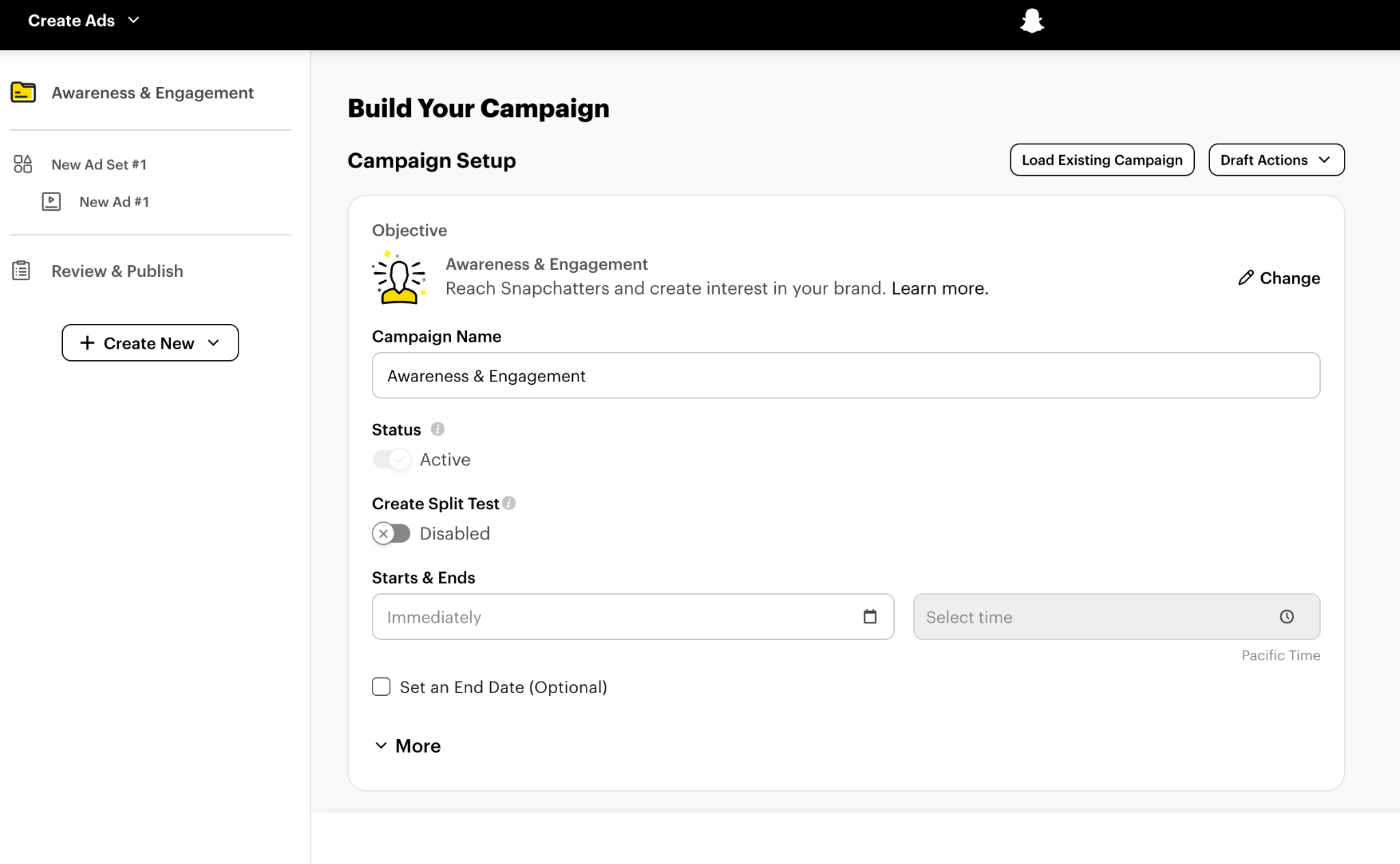
- Configure your campaign details (name, budget, schedule)
- In the Ad Set, scroll to the Audience section
- Click Custom Audiences → Select "Profile Engagement Audience"
- Choose the audience(s) you created (you can select multiple)
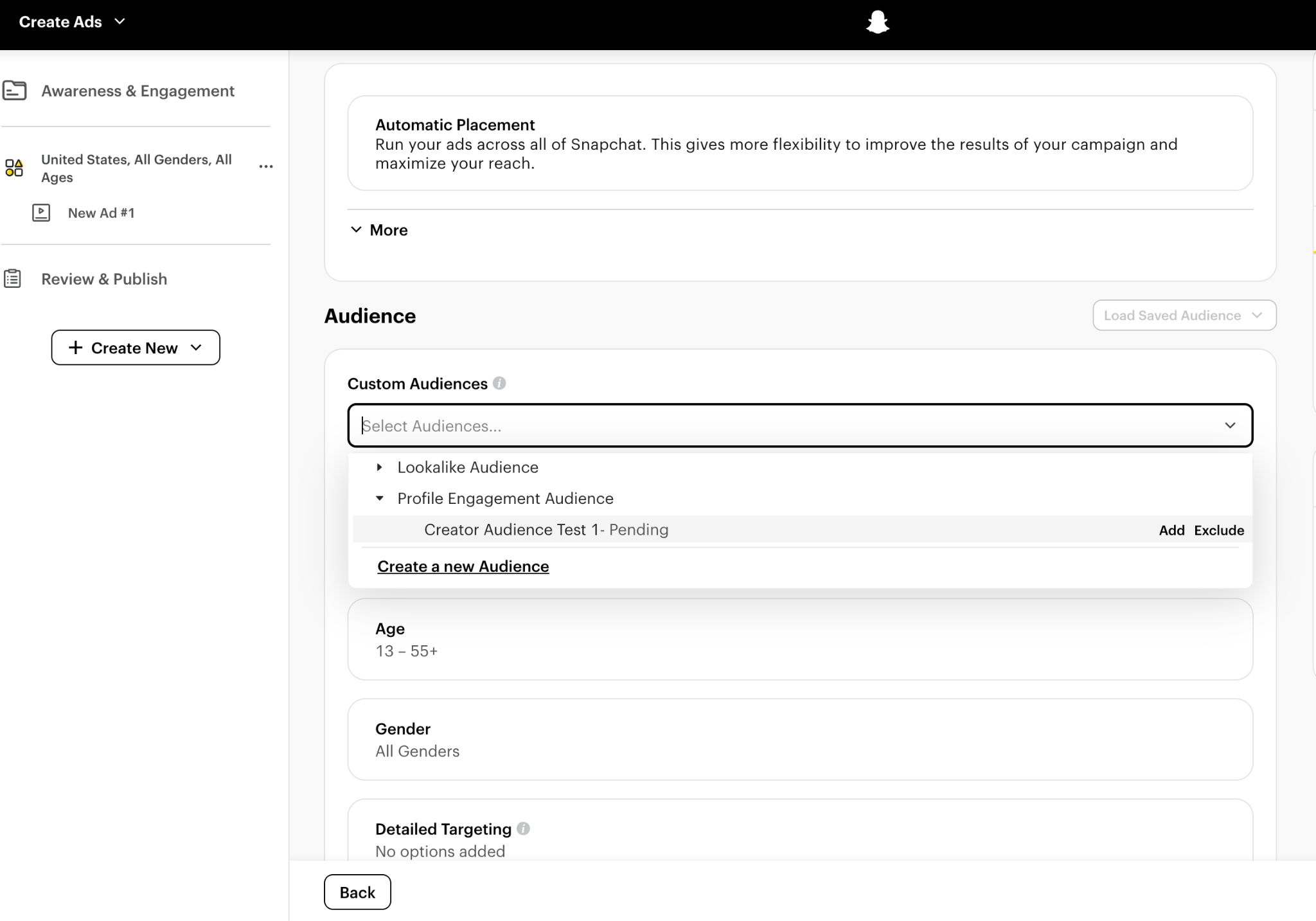
You can select multiple audiences at once (e.g., both subscriber and engager audiences, plus lookalikes) to maximize reach.
- Enable Partnership Ad and configure creative:
- Follow the steps in Ad Partnerships - Step 3: Upload Creative and Enable Partnership to:
- Upload your media
- Toggle "Partnership Ad" to ON
- Select the creator's profile whose audience you're using
- Use "Swap Primary" to choose the ad sender
- Follow the steps in Ad Partnerships - Step 3: Upload Creative and Enable Partnership to:
The "Partnership Ad" toggle must be enabled when using creator audiences. Your campaign will fail publishing without it.
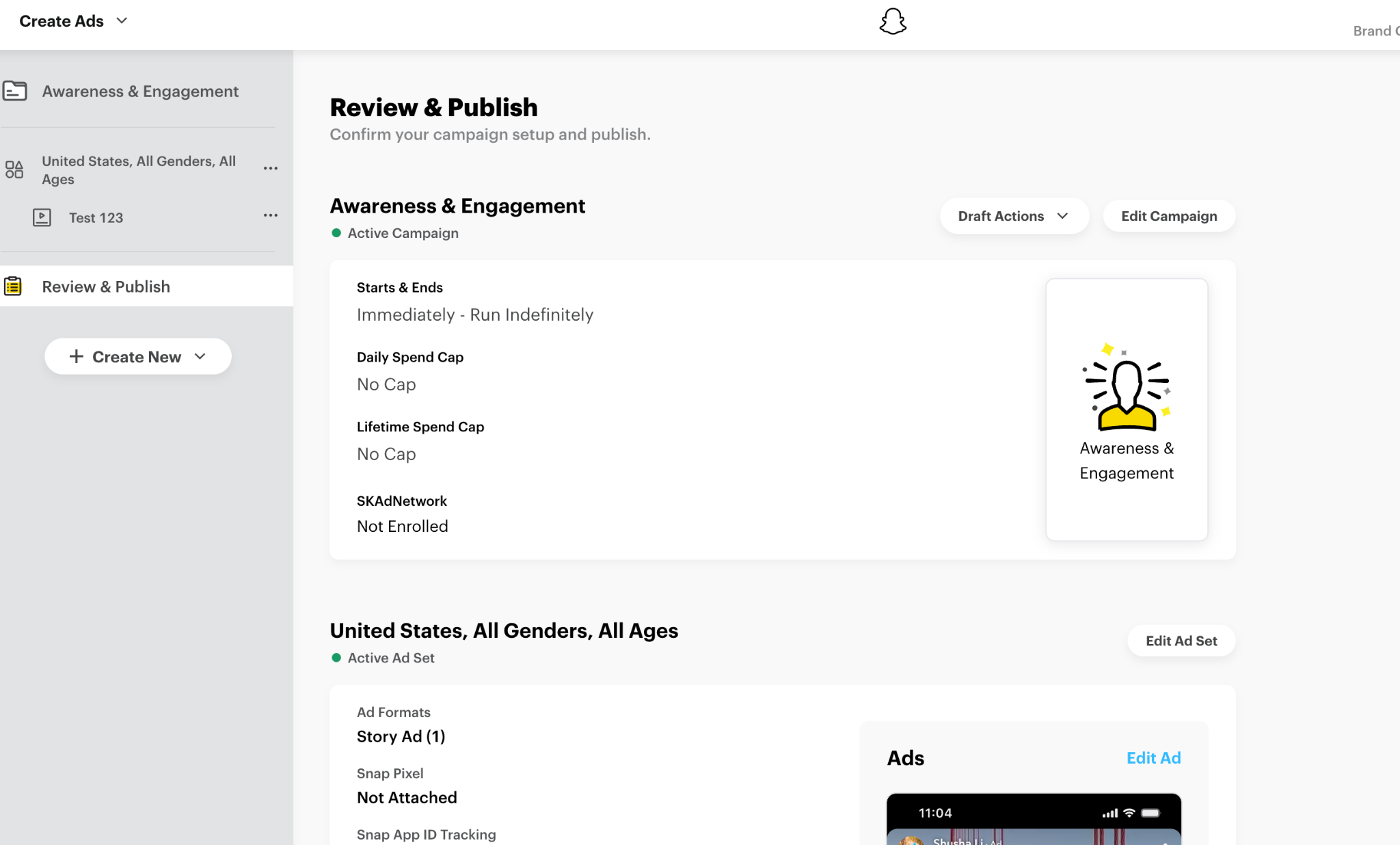
- Review and publish your campaign
Developer Track
The Creator Audience Targeting workflow uses the Segments API to create profile-based audiences and apply them to campaigns. This guide focuses on when and why to call each endpoint—for full parameter details, see the linked API references.
Complete Partnership Setup — You must have an active AD_LEVEL partnership before proceeding
APIs Used:
- Profile Engagement Audiences — Create audiences from creator profiles
- Lookalike Audiences — Expand reach with similar users
- Ad Squads API — Apply audiences to campaigns
Step 1: Verify Partnership Status
Before creating audiences, confirm you have AD_LEVEL access to the creator's profile.
What to do:
- Call
GET /v1/public_profiles/{profile_id}/ad_partner_profiles - Verify the creator shows
partnership_status: "ACCEPTED" - If not accepted, see Partnership Setup to establish the partnership
Only AD_LEVEL partnerships grant audience targeting permissions. BRAND_LEVEL partnerships will not work for this feature.
API Reference: List Ad Partner Profiles
Step 2: Create Profile Engagement Audience
Build an audience from the creator's subscribers or engagers.
What to do:
- Call
POST /v1/adaccounts/{ad_account_id}/segmentswithsegment_type: "PROFILE_ENGAGEMENT" - Set
engagement_typeto either:SUBSCRIBERS— All followers of the creatorENGAGERS— Users who interacted with the creator's content (stories, spotlight, lenses)
- Include the creator's
source_profile_id - Optionally set
retention_in_daysto limit how recent the engagement must be (default: 30 days) - Response returns
segment_idwith statusACTIVE(ready to use immediately)
API Reference: Profile Engagement Audiences
Step 3: Create Lookalike Audience (Optional)
Expand your reach by finding users similar to the creator's audience.
What to do:
- Call
POST /v1/adaccounts/{ad_account_id}/segmentswithsource_type: "LOOKALIKE" - In the
creation_spec, set:seed_segment_id— The segment ID from Step 2lookalike_type— ChooseSIMILARITY,BALANCE, orREACHcountry— Target country (e.g.,US,GB)
- Response returns
segment_idwith statusPENDING - Poll
GET /v1/segments/{segment_id}until status isACTIVE(typically a few hours)
Unlike profile engagement audiences, lookalikes require processing time. Poll every 10-15 minutes until status: "ACTIVE".
API Reference: Lookalike Audiences
Step 4: Apply Audiences to Ad Sets
Use your creator audiences when creating Ad Sets.
What to do:
- Call
POST /v1/adaccounts/{ad_account_id}/adsquads - In the
targetingobject, include your segment IDs:"targeting": {
"segments": [
{"segment_id": "profile-engagement-id", "operation": "INCLUDE"},
{"segment_id": "lookalike-id", "operation": "INCLUDE"}
]
} - Critical: Set
creator_partnership_type: "AD_PARTNERSHIP"in your creative - Critical: Enable partnership settings in the creative by setting
primary_profileto either:BRAND— Ad appears from your brandCREATOR— Ad appears from the creator's profile
Ad Sets using creator audiences must have associated creatives with creator_partnership_type set. Without this, the campaign will fail to publish.
API Reference:
Next Steps
- Ad Partnerships — Combine audience targeting with creator-branded ads
- Technical Reference — Detailed schemas for audience endpoints
- Troubleshooting — Common errors and solutions