Navigation Kit Components
This section gives a high level overview of the package. More detail can be found below in the API Reference section.
Core
Navigation Data Component
The NavigationDataComponent holds a list of Places and provides APIs to select a Place for navigation, and fires useful events such as onArrivedAtPlace. Other components in this kit subscribe to events on NavigationDataComponent.
Place
A Place represents a navigable location and comprises information such as name, description, and icon. The following specialised location types derive from the Place class:
GeoLocationPlace: A place that gets its position from a geoposition.CustomLocationPlace: A place that gets its position from aLocatedAtComponentrepresenting a Custom Location created on Spectacles. The Custom Location's geoposition is used for navigation and is refined by successful location tracking if possible.SceneObjectPlace: A place defined only in virtual space, without an associated physical location.
UserPosition and EditableUserPosition
EditableUserPosition implements the UserPosition interface and represents the user's position in both virtual and geo spaces. APIs are provided to get distance and bearing relative to a Place.
Assets
The package contains two ready-to-use assets, a menu and a 3D navigation arrow:
- The menu asset can be found inside the
Navigation Kitprefab, which in turn can be found in the package root. Dragging this prefab into the scene will also add the menu. - Adding the
ARNavigationPrefab [PUT_IN_SCENE]prefab to your Scene will add a 3D arrow that will point to the currently selectedPlace. You will find this in theARNavigationComponentfolder.
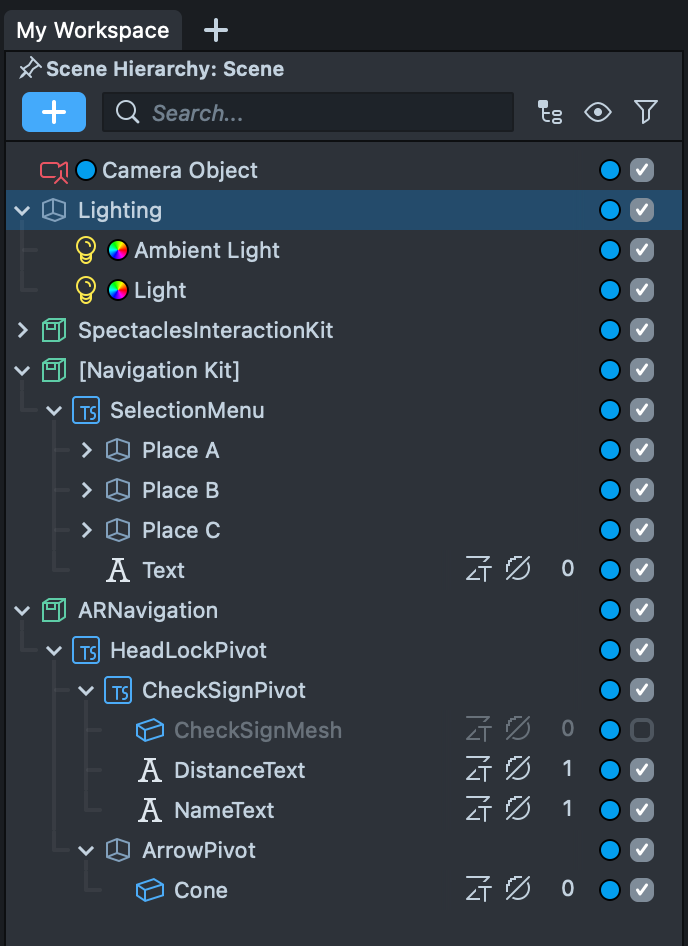
Together these form a working example of how to use the kit.
Scripts
The above assets are controlled by these scripts:
ExampleMenu
This contains a simple example of how to read Places from the NavigationDataComponent, and how to select a Place to which to navigate.
ARNavigation
Controls the 3D arrow used to guide the user. This script also contains examples demonstrating how to subscribe to events from the NavigationDataComponent, and examples demonstrating the use of the orientation and distance functions.
API Reference
This section details the functions and properties of the main scripts provided in the kit.
NavigationDataComponent
Handles the navigation location data and tracking logic which can be used to generate a guided experience. From this component you can add navigable places and select the place to which to navigate. The component also exposes a number of callbacks, which are triggered when the user approaches the selected destination, reaches the destination, and leaves the destination. Callbacks are also triggered when all places from the guided experience have been visited. The component automatically switches between tracking technologies to make sure the best available technology is used.
| Signature | Type | Description |
|---|---|---|
| METHODS | ||
| addPlace | function (place: Place) → void | Adds a new place of interest to the guided experience. |
| removePlace | function (place: Place) → void | Removes the provided location from the guided experience. |
| getUserPosition | function () → UserPosition | Retrieves the users position for navigation purposes. |
| navigateToPlace | function (place: Place) → void | Selects a location to provide directions towards and triggers the tracking logic to navigate to the selected location. |
| stopNavigation | function () → void | Removes the current selected location for navigation purposes and stops any tracking attached to it if necessary. |
| PROPERTIES | ||
| status | NavigationStatus | Represents the status of the navigation component. |
| arrivalRadius | number | Radius in meters to determine if the user has reached the selected destination. |
| places | Place[] | The list of registered places. |
| EVENTS | ||
| onNavigationStarted | PublicApi<Place> | Triggered when navigation has been started. |
| onPlacesUpdated | PublicApi<void> | Triggered when the list of places has been changed. |
| onArrivedAtPlace | PublicApi<Place> | Triggered when a place has been reached. |
| onAllPlacesVisited | PublicApi<void> | Triggered when all places have been visited. |
Example Code
- TypeScript
- JavaScript
@input navigationComponent: NavigationDataComponent

/*
 * Called from a menu of Places that can be selected as the active tracked.
 */
public navigationLocationSelected(place: Place): void
{
	this.navigationModule.navigateToPlace(place)
}

/*
 * Selects the nearest Place to be tracked.
 */
public selectNearest(): void
{
	const nearestPlace = this.navigationComponent.places
        .sort(/*lowest distance*/)
        .first()
	this.navigationComponent.navigateToLocation(nearestPlace)
}

/*
 * Subscribed to navigationComponent.onNavigationStarted to update menus
 */
public onNavigationLocationSelected(place: Place): void
{
	this.myMenuImage.image = place.icon
	this.myMenuTitle.text = place.name
}
// @input Component.ScriptComponent navigationComponent

/*
 * Called from a menu of Places that can be selected as the active tracked.
 */
function navigationLocationSelected(place) {
  script.navigationComponent.navigateToPlace(place);
}

/*
 * Selects the nearest Place to be tracked.
 */
function selectNearest() {
  const nearestPlace =
    script.navigationComponent.places.sort(/*lowest distance*/)[0];
  script.navigationComponent.navigateToPlace(nearestPlace);
}

/*
 * Subscribed to navigationComponent.onNavigationStarted to update menus
 */
function onNavigationLocationSelected(place) {
  myMenuImage.image = place.icon;
  myMenuTitle.text = place.name;
}
NavigationStatus
An enumeration of supported statuses in the navigation component.
| Name | Description |
|---|---|
| LocationNotSelected | No place to navigate to has yet been provided. Use the navigateToPlace(place: Place) function to select one. |
| Initializing | The resources for the relevant tracking technology are being initialized. |
| InProgress | Navigation directions towards the selected location are being computed as expected. The user is expected to be following directions. |
| Succeeded | Navigation directions were provided and the user successfully reached the destination. |
Place
A place of interest or physical location in the world that can be navigated to, e.g. a geo-location or Custom Location.
| Signature | Type | Description |
|---|---|---|
| METHODS | ||
| getRelativePosition | function () → vec3 | null | Returns the relative position of this location with respect to the initial position of the user when the session started. This position is not geo-referenced in the Earth’s global coordinate frame and its reference frame corresponds with the world reference frame set by DeviceTracking component when choosing ‘World’. Returns null when using geo-referenced navigation locations and the geo-referenced user position is not available. |
| getGeoPosition | function () → GeoPosition | null | Returns the geo-referenced position of this location in the world, represented using the GeoPosition data structure. Contains latitude, longitude and altitude among other data. |
| requestNewGeoPosition | function () → boolean | Requests an update to the geo-referenced position of this place. Returns true if accepted, false if rejected. |
| getOrientation | function () → quat | Returns the orientation of the location represented as a quaternion. |
| PROPERTIES | ||
| name | string | The name of the place. |
| icon | Texture | An icon representing this location. |
| description | string | A description of the place. |
| visited | boolean | True if the user has gone to this place in this session. |
| ready | boolean | True if the place has been initialized and content is ready for arrival. |
| EVENTS | ||
| onStatusUpdated | PublicApi<void> | Triggers when the internal status has changed. |
UserPosition
Represents the position of the user in both world and geo space. Updates when new data is received.
| Signature | Type | Description |
|---|---|---|
| METHODS | ||
| initializeGeoLocationUpdates | function (accuracy: GeoLocationAccuracy, updateFrequency: number)) → void | Initializes the user position for use, taking the accuracy to be used and the time between refreshes of the users position. |
| getGeoPosition | function () → GeoPosition | null | The position of the user in Geo Space. |
| getNorthAlignedOrientation | function () → quat | Returns a quaternion representing the north aligned orientation of the user. |
| getBearing | function () → number | Returns the users north aligned orientation in radians. Indicates how far off from heading north the device is. Zero represents true north, and the direction is determined clockwise. |
| getRelativeTransform | function () → Transform | Returns the relative position and orientation of the user with respect to the initial position of the user when the session started. |
| getDistanceTo | function (location: Place) → number | null | Returns the distance, in meters, from the user to the provided navigation location. Null if it can't be calculated. |
| getBearingTo | function (location: Place, world: boolean) → number | null | Returns the bearing, in radians, from the current user position to the navigation target location. If world is true the users bearing will not be taken into account. |
| PROPERTIES | ||
| status | UserPositionStatus | Returns the status of the internal location, for use with debugging potentially hidden code. |
| gpsActive | boolean | Returns true if GPS is active. |
| EVENTS | ||
| onUserPositionUpdated | PublicApi<void> | Called when the position has been updated. |
Example Code
- TypeScript
- JavaScript
  /**
   * Calculates the distance between the user and a given `GeoLocation`.
   */
  private getPhysicalDistance(userPosition: UserPosition): number | null {
    const userGeoPosition = userPosition.getGeoPosition()
    if (isNull(userGeoPosition)) {
      return null
    }
    return getPhysicalDistanceBetweenLocations(userGeoPosition, this.getGeoPosition())
  }


  /**
    * Called whenever the user position is updated to update the target rotation of a scene object pointing the way.
    */
  private onUserPositionUpdated(): void {
    const angle = this.userPosition.getBearingTo(this.selectedPlace, true)
    this.targetRotation = quat.angleAxis(-angle, vec3.up())
  }
/**
 * Calculates the distance between the user and a given `GeoLocation`.
 */
function getPhysicalDistance(userPosition) {
  const userGeoPosition = userPosition.getGeoPosition();
  if (isNull(userGeoPosition)) {
    return null;
  }
  return getPhysicalDistanceBetweenLocations(userGeoPosition, getGeoPosition());
}

/**
 * Called whenever the user position is updated to update the target rotation of a scene object pointing the way.
 */
function onUserPositionUpdated() {
  const angle = userPosition.getBearingTo(selectedPlace, true);
  targetRotation = quat.angleAxis(-angle, vec3.up());
}
UserPositionStatus
Represents the positioning status, good for debugging potentially inaccurate or missing location data.
| Name | Description |
|---|---|
| Unknown | User position can not be determined. |
| UnknownErrorNetworkMissing | Position unknown as could not connect to any network. |
| UnknownPoorGPSReception | Position unknown due to poor GPS. |
| GeoLocalizationAvailable | Working and available. |
| GlobalLocalizationPoorGPSReception | Location found, but inaccurate. |
| ErrorTrackingAssetFailedToDownload | Could not download the necessary assets. |