Bitmoji 3D
The Bitmoji 3D package downloads and displays 3D Bitmoji avatars in Spectacles Lenses.
Prerequisites
- Lens Studio v5.15.0 or later
- Spectacles OS v5.63.x or later
- Bitmoji 3D package (available in Asset Library)
Installation
- Open your Spectacles project in Lens Studio
- Navigate to Asset Library
- Search for "Bitmoji 3D"
- Click "Install" to add the package to your project
Connected Lenses Usage
Bitmoji 3D can be used with Spectacles Sync Kit to display avatars for users in a Connected Lens session. Retrieve the SnapchatUser object from the active session, then download and instantiate the Bitmoji avatar using the steps below.
Setup
- Install Bitmoji 3D and Spectacles Sync Kit from Asset Library
- Follow the Spectacles Sync Kit documentation to set up your multiplayer session
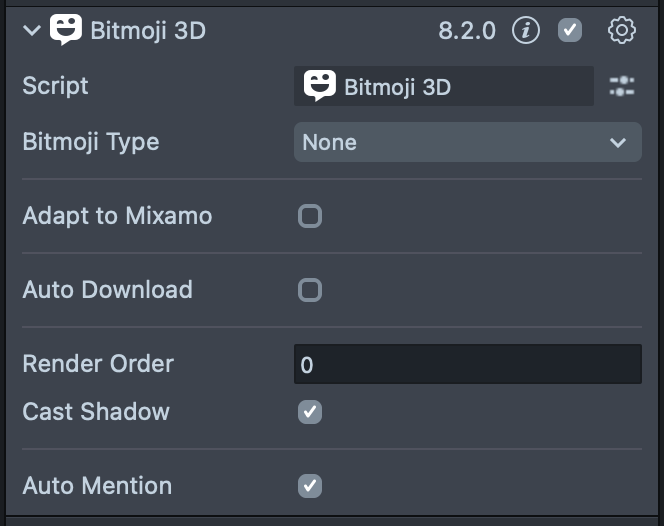
- Add a Bitmoji 3D component to your scene
- Configure it: Set Bitmoji Type to "None" and disable Auto Download
- Create a script and reference the Bitmoji component as an input
Code Example
- TypeScript
- JavaScript
Step 1: Get SnapchatUser from Connection ID
import { SessionController } from "SpectaclesSyncKit.lspkg/Core/SessionController";

private sessionController: SessionController = SessionController.getInstance();

private getSnapchatUserByConnectionId(connectionId: string): Promise<SnapchatUser> {
    return new Promise((resolve, reject) => {
        const session = this.sessionController.getSession();
        const matchingUserInfo = session.activeUsersInfo.find(
            (userInfo) => userInfo && userInfo.connectionId === connectionId
        );

        if (matchingUserInfo) {
            session.getSnapchatUser(matchingUserInfo, resolve);
        } else {
            reject(`User ${connectionId} not found in active users`);
        }
    });
}
Step 2: Download Avatar for User
import { Bitmoji3D } from "Bitmoji 3D.lsc/Bitmoji 3D.lsc/Bitmoji 3D";

@input
bitmojiComponent: Bitmoji3D;

private async loadPlayerBitmoji(connectionId: string) {
    try {
        const user = await this.getSnapchatUserByConnectionId(connectionId);
        await this.bitmojiComponent.downloadAvatarForUser(user);

        const avatar = this.bitmojiComponent.getAvatar();
        if (avatar) {
            print('Bitmoji loaded successfully!');
        }
    } catch (e) {
        print(`Error loading bitmoji: ${e}`);
    }
}
Step 3: Full Example
import { SessionController } from 'SpectaclesSyncKit.lspkg/Core/SessionController';
import { Bitmoji3D } from 'Bitmoji 3D.lsc/Bitmoji 3D.lsc/Bitmoji 3D';

@component
export class ConnectedLensBitmoji extends BaseScriptComponent {
  private sessionController: SessionController =
    SessionController.getInstance();
  @input
  bitmojiComponent: Bitmoji3D;

  onAwake() {
    this.sessionController.notifyOnReady(() => {
      const connectionId = this.sessionController.getLocalConnectionId();
      this.getSnapchatUserByConnectionId(connectionId);
      this.loadPlayerBitmoji(connectionId);
    });
  }

  private getSnapchatUserByConnectionId(
    connectionId: string
  ): Promise<SnapchatUser> {
    return new Promise((resolve, reject) => {
      const session = this.sessionController.getSession();
      const matchingUserInfo = session.activeUsersInfo.find(
        (userInfo) => userInfo && userInfo.connectionId === connectionId
      );

      if (matchingUserInfo) {
        session.getSnapchatUser(matchingUserInfo, resolve);
        print(
          `Found user ${matchingUserInfo.displayName} for connection ID ${connectionId}`
        );
      } else {
        reject(`User ${connectionId} not found in active users`);
      }
    });
  }

  private async loadPlayerBitmoji(connectionId: string) {
    try {
      const user = await this.getSnapchatUserByConnectionId(connectionId);
      await this.bitmojiComponent.downloadAvatarForUser(user);
      const avatar = this.bitmojiComponent.getAvatar();
      if (avatar) {
        print('Bitmoji loaded successfully!');
      }
    } catch (e) {
      print(`Error loading bitmoji: ${e}`);
    }
  }
}
Step 1: Get SnapchatUser from Connection ID
const SessionController =
  require('SpectaclesSyncKit.lspkg/Core/SessionController').SessionController;
const sessionController = SessionController.getInstance();

function getSnapchatUserByConnectionId(connectionId, onSuccess, onError) {
  const session = sessionController.getSession();
  const matchingUserInfo = session.activeUsersInfo.find(function (userInfo) {
    return userInfo && userInfo.connectionId === connectionId;
  });

  if (matchingUserInfo) {
    session.getSnapchatUser(matchingUserInfo, onSuccess);
  } else {
    onError('User ' + connectionId + ' not found in active users');
  }
}
Step 2: Download Avatar for User
// @input Component.ScriptComponent bitmojiComponent

function loadPlayerBitmoji(connectionId) {
  getSnapchatUserByConnectionId(
    connectionId,
    function (user) {
      script.bitmojiComponent.downloadAvatarForUser(user);

      const avatar = script.bitmojiComponent.getAvatar();
      if (avatar) {
        print('Bitmoji loaded successfully!');
      }
    },
    function (error) {
      print('Error loading bitmoji: ' + error);
    }
  );
}
Step 3: Full Example
const SessionController =
  require('SpectaclesSyncKit.lspkg/Core/SessionController').SessionController;

//@input Component.ScriptComponent bitmojiComponent

script.sessionController = SessionController.getInstance();

script.sessionController.notifyOnReady(function () {
  var connectionId = script.sessionController.getLocalConnectionId();
  getSnapchatUserByConnectionId(connectionId);
  loadPlayerBitmoji(connectionId);
});

function getSnapchatUserByConnectionId(connectionId) {
  return new Promise(function (resolve, reject) {
    var session = script.sessionController.getSession();
    var matchingUserInfo = session.activeUsersInfo.find(function (userInfo) {
      return userInfo && userInfo.connectionId === connectionId;
    });

    if (matchingUserInfo) {
      session.getSnapchatUser(matchingUserInfo, resolve);
    } else {
      reject('User ' + connectionId + ' not found in active users');
    }
  });
}

async function loadPlayerBitmoji(connectionId) {
  try {
    var user = await getSnapchatUserByConnectionId(connectionId);
    await script.bitmojiComponent.downloadAvatarForUser(user);
    var avatar = script.bitmojiComponent.getAvatar();
    if (avatar) {
      print('Bitmoji loaded successfully!');
    }
  } catch (e) {
    print('Error loading bitmoji: ' + e);
  }
}
Privacy & Friendship: If users are not Snapchat friends or have Bitmoji privacy restrictions enabled, a randomized Bitmoji will be loaded instead of their actual avatar.
Related Resources
Was this page helpful?