
Storage
This guide will show you how to configure and download data from Storage. You can use Storage to store images, videos, documents, and any other file type. These assets can be served with a global CDN to reduce latency from over 285 cities globally.
Before proceeding, first set up your project as per the Getting Started guide.
For full reference documentation refer to the Snap Cloud documentation site.
Configure a Storage Bucket
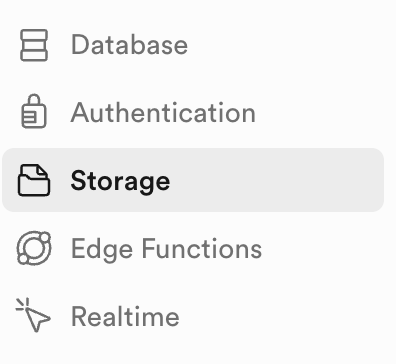
We'll start by configuring a storage bucket. Open the Snap Cloud Dashboard and navigate to the Storage pane.
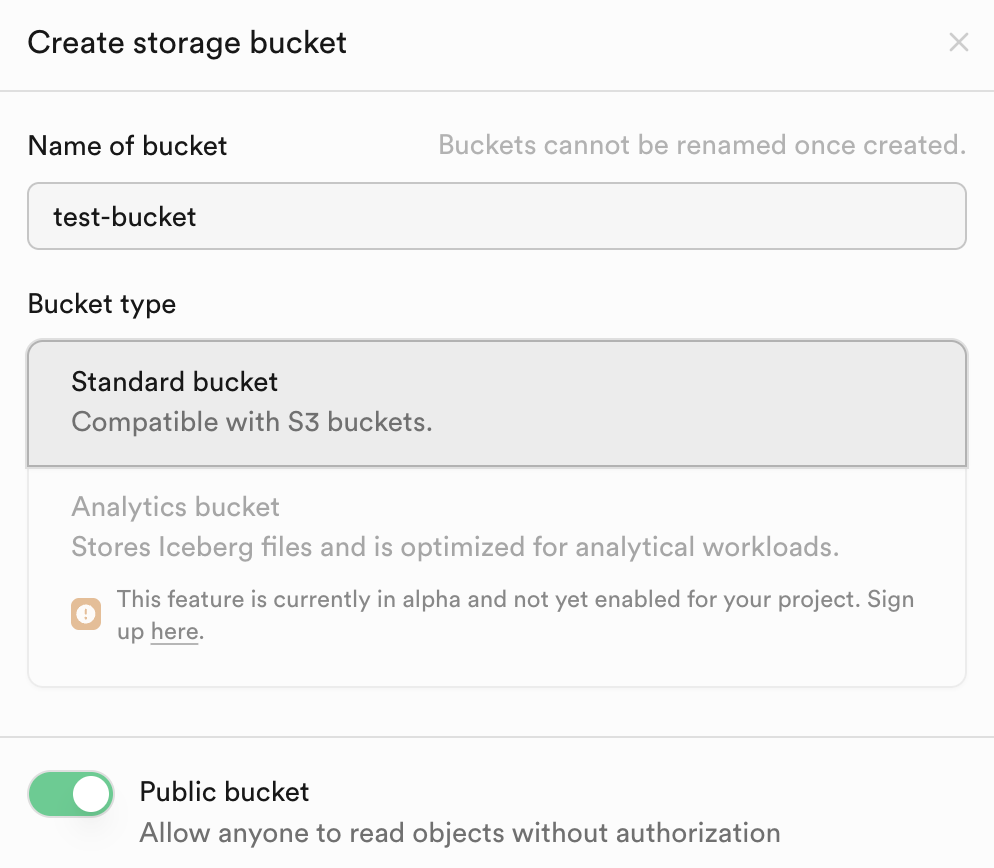
Click on New Bucket and name the bucket test-bucket. Make the bucket public by toggling Public Bucket. Click Create to finish deploying the bucket.
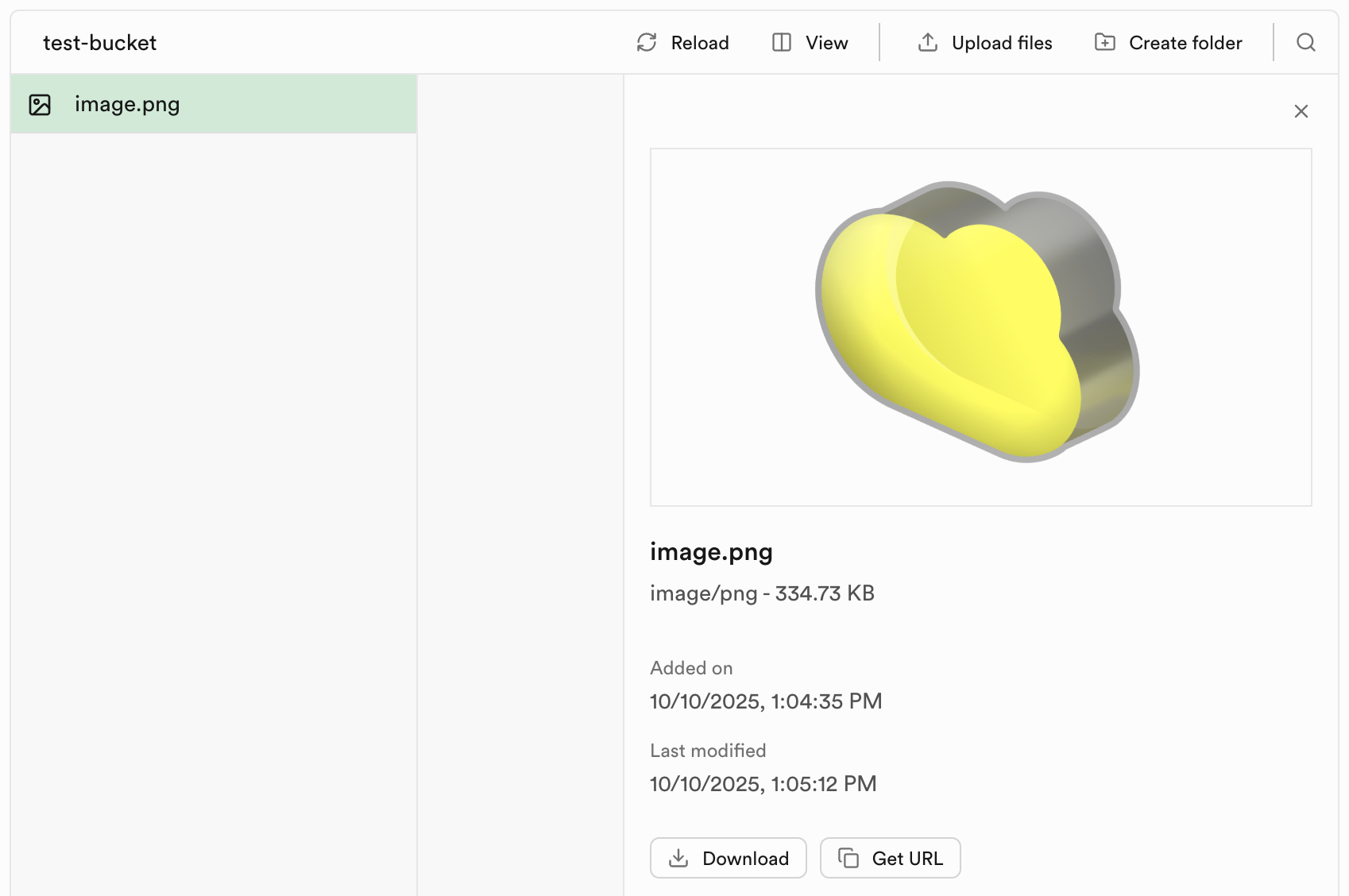
Now, upload any PNG image of your choosing to the bucket by dragging and dropping it into the bucket's upload area. Name the image you upload image.png.
Before accessing the contents of any bucket, you have to apply security policies. To do this, under Configuration in the Storage sidebar, click Policies. Find your bucket and click New policy and Get started quicky.
Select Give users access to a folder only to authenticated users. Select all of SELECT, INSERT, UPDATE, DELETE, then click Review and Save Policy.
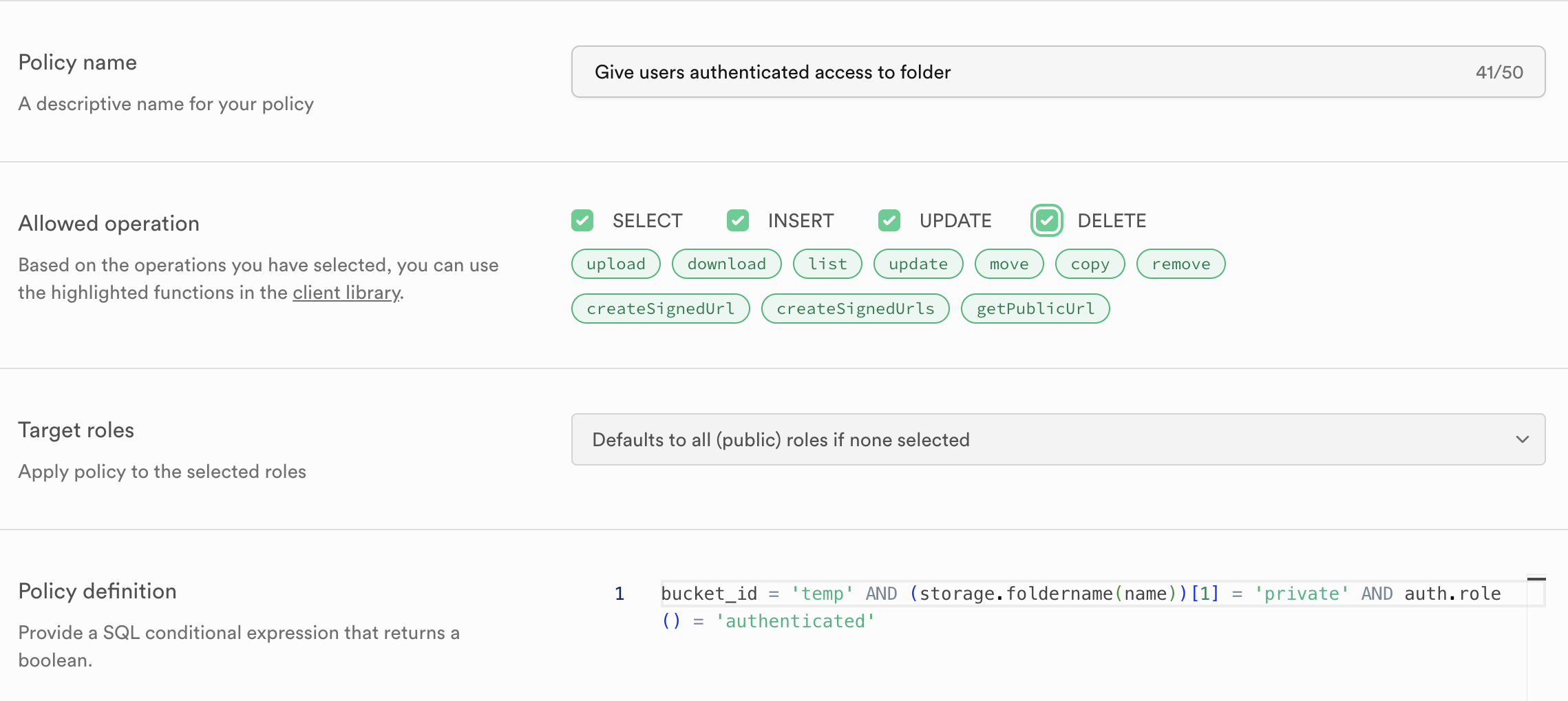
For more detail on policies see the Storage section of the reference documentation.
Organizing Files in Storage
It's good practice to organize your files in the bucket using folders based on file type. This makes it easier to manage and access your assets. For example:
images/spectacles.jpgmodels/rabbit.glbaudio/chill.mp3
Downloading Assets to a Lens
Back in Lens Studio, you can download various types of assets from storage including images, 3D models, and audio files. The following complete example demonstrates how to download and use different asset types.
Images:
- Requires an
Imagecomponent in your scene where the downloaded texture will be displayed - The downloaded image will be converted from a Blob to a Texture using the InternetModule and RemoteMediaModule
3D Models:
- Requires a simple PBR Material to apply to the model
- Requires an empty SceneObject as a parent reference for the loaded model
- We recommend using the
.glbformat for 3D models - Important: The model's scale or rotation might not be visible at first. Make sure to play with scale, parenting, and rotation settings. You can also use the Preview Inspector to visualize and position the 3D model correctly when downloaded
- Example: You can test with this rabbit model example (note: clicking this link will download a .glb file from gltftests.com)
Audio:
- Requires a SceneObject with an AudioComponent attached to play the audio
- The audio will be loaded as an AudioTrackAsset and applied to the AudioComponent
- TypeScript
- JavaScript
import {
  createClient,
  SupabaseClient,
} from 'SupabaseClient.lspkg/supabase-snapcloud';

const remoteMediaModule = require('LensStudio:RemoteMediaModule');
const internetModule = require('LensStudio:InternetModule');

@component
export class StorageExample extends BaseScriptComponent {
  @input
  @hint('Supabase Project asset from Asset Browser')
  supabaseProject: SupabaseProject;

  @input
  @hint('Storage bucket name')
  bucketName: string = 'test-bucket';

  @input
  @hint("Image file path in bucket (e.g., 'images/spectacles.jpg')")
  imageFilePath: string = 'image.png';

  @input
  @hint("3D model file path in bucket (e.g., 'models/rabbit.glb')")
  modelFilePath: string = 'model.glb';

  @input
  @hint("Audio file path in bucket (e.g., 'audio/chill.mp3')")
  audioFilePath: string = 'audio.mp3';

  @input
  @hint('Image component to display downloaded texture')
  image: Image;

  @input
  @allowUndefined
  @hint('Optional: Parent scene object for the loaded 3D model')
  modelParent: SceneObject;

  @input
  @allowUndefined
  @hint('Optional: Scene object with AudioComponent to play loaded audio')
  audioPlayer: SceneObject;

  @input
  @allowUndefined
  @hint('Optional: Material to use for 3D models')
  defaultMaterial: Material;

  private client: SupabaseClient;
  private uid: string;

  onAwake() {
    this.createEvent('OnStartEvent').bind(() => {
      this.onStart();
    });
  }

  onStart() {
    this.initSupabase();
  }

  async initSupabase() {
    this.log('Initializing Supabase client...');

    const options = {
      realtime: {
        heartbeatIntervalMs: 2500,
      },
    };

    this.client = createClient(
      this.supabaseProject.url,
      this.supabaseProject.publicToken,
      options
    );

    if (this.client) {
      this.log('Client created successfully');
      await this.signInUser();

      if (this.uid) {
        this.log('Running storage examples...');
        await this.runStorageExamples();
      }
    }
  }

  async signInUser() {
    this.log('Signing in user...');

    const { data, error } = await this.client.auth.signInWithIdToken({
      provider: 'snapchat',
      token: '',
    });

    if (error) {
      this.log('Sign in error: ' + JSON.stringify(error));
    } else {
      const { user, session } = data;
      this.uid = JSON.stringify(user.id).replace(/^"(.*)"$/, '$1');
      this.log('User authenticated');
    }
  }

  async runStorageExamples() {
    this.log('--- STORAGE EXAMPLES START ---');

    await this.testListFiles();

    await this.delay(500);
    await this.testDownloadImage();

    if (this.modelParent && this.modelFilePath) {
      await this.delay(500);
      await this.testDownload3DModel();
    }

    if (this.audioPlayer && this.audioFilePath) {
      await this.delay(500);
      await this.testDownloadAudio();
    }

    this.log('--- STORAGE EXAMPLES COMPLETE ---');
  }

  async testListFiles() {
    this.log('Listing files in bucket: ' + this.bucketName);

    const { data, error } = await this.client.storage
      .from(this.bucketName)
      .list('', {
        limit: 10,
        offset: 0,
      });

    if (error) {
      this.log('List files failed: ' + JSON.stringify(error));
      return;
    }

    if (data && data.length > 0) {
      this.log('Found ' + data.length + ' files:');
      data.forEach((file, index) => {
        this.log(
          '  ' +
            (index + 1) +
            '. ' +
            file.name +
            ' (' +
            file.metadata.size +
            ' bytes)'
        );
      });
    } else {
      this.log('No files found in bucket');
    }
  }

  async testDownloadImage() {
    this.log('Downloading image: ' + this.imageFilePath);
    this.log('From bucket: ' + this.bucketName);

    const { data, error } = await this.client.storage
      .from(this.bucketName)
      .download(this.imageFilePath);

    if (error) {
      this.log('Download failed: ' + JSON.stringify(error));
      return;
    }

    if (data) {
      this.log('Download successful');
      this.log('File size: ' + data.size + ' bytes');
      this.log('File type: ' + data.type);

      this.convertBlobToTexture(data);
    } else {
      this.log('Download failed: No data returned');
    }
  }

  async testDownload3DModel() {
    this.log('Downloading 3D model: ' + this.modelFilePath);
    this.log('From bucket: ' + this.bucketName);

    const publicUrl = this.client.storage
      .from(this.bucketName)
      .getPublicUrl(this.modelFilePath);

    if (!publicUrl || !publicUrl.data || !publicUrl.data.publicUrl) {
      this.log('Failed to get public URL for model');
      return;
    }

    const modelUrl = publicUrl.data.publicUrl;
    this.log('Model URL: ' + modelUrl);

    try {
      const resource = (internetModule as any).makeResourceFromUrl(modelUrl);

      if (!resource) {
        this.log('Failed to create resource from URL');
        return;
      }

      remoteMediaModule.loadResourceAsGltfAsset(
        resource,
        (gltfAsset) => {
          this.log('GLTF asset loaded successfully');

          const gltfSettings = GltfSettings.create();
          gltfSettings.convertMetersToCentimeters = true;

          gltfAsset.tryInstantiateAsync(
            this.sceneObject,
            this.defaultMaterial,
            (sceneObj) => {
              this.log('GLTF model instantiated successfully');
              this.finalizeModelInstantiation(sceneObj);
            },
            (error) => {
              this.log('Error instantiating GLTF: ' + error);
            },
            (progress) => {
              if (progress === 0 || progress === 1) {
                this.log(
                  'Model load progress: ' + Math.round(progress * 100) + '%'
                );
              }
            },
            gltfSettings
          );
        },
        (error) => {
          this.log('Error loading GLTF asset: ' + error);
        }
      );
    } catch (err) {
      this.log('Error downloading 3D model: ' + err);
    }
  }

  async testDownloadAudio() {
    this.log('Downloading audio: ' + this.audioFilePath);
    this.log('From bucket: ' + this.bucketName);

    const publicUrl = this.client.storage
      .from(this.bucketName)
      .getPublicUrl(this.audioFilePath);

    if (!publicUrl || !publicUrl.data || !publicUrl.data.publicUrl) {
      this.log('Failed to get public URL for audio');
      return;
    }

    const audioUrl = publicUrl.data.publicUrl;
    this.log('Audio URL: ' + audioUrl);

    try {
      const resource = (internetModule as any).makeResourceFromUrl(audioUrl);

      if (!resource) {
        this.log('Failed to create resource from URL');
        return;
      }

      remoteMediaModule.loadResourceAsAudioTrackAsset(
        resource,
        (audioAsset) => {
          this.log('Audio asset loaded successfully');
          this.applyAudioToObject(audioAsset);
        },
        (error) => {
          this.log('Error loading audio asset: ' + error);
        }
      );
    } catch (err) {
      this.log('Error downloading audio: ' + err);
    }
  }

  finalizeModelInstantiation(sceneObj: SceneObject) {
    try {
      const transform = sceneObj.getTransform();

      if (this.modelParent) {
        sceneObj.setParent(this.modelParent);
        this.log('Model parented to: ' + this.modelParent.name);
        transform.setLocalPosition(vec3.zero());
        transform.setLocalScale(vec3.one());
      }

      this.log('3D model loaded and positioned successfully');
    } catch (error) {
      this.log('Error finalizing model: ' + error);
    }
  }

  applyAudioToObject(audioAsset: AudioTrackAsset) {
    try {
      if (!this.audioPlayer) {
        this.log('No audio player assigned');
        return;
      }

      let audioComponent = this.audioPlayer.getComponent(
        'Component.AudioComponent'
      );

      if (!audioComponent) {
        audioComponent = this.audioPlayer.createComponent(
          'Component.AudioComponent'
        );
        this.log('Created AudioComponent');
      }

      audioComponent.audioTrack = audioAsset;
      audioComponent.volume = 0.8;
      audioComponent.play(1);

      this.log('Audio applied and playing');
    } catch (error) {
      this.log('Error applying audio: ' + error);
    }
  }

  convertBlobToTexture(blob: Blob) {
    this.log('Converting blob to texture...');

    try {
      const dynamicResource = internetModule.makeResourceFromBlob(blob);

      remoteMediaModule.loadResourceAsImageTexture(
        dynamicResource,
        (texture) => {
          this.log('Texture created successfully');
          this.applyTextureToImage(texture);
        },
        (error) => {
          this.log('Failed to create texture: ' + error);
        }
      );
    } catch (err) {
      this.log('Error converting blob: ' + err);
    }
  }

  applyTextureToImage(texture: Texture) {
    if (!this.image) {
      this.log('No image component assigned');
      return;
    }

    this.log('Applying texture to image component');

    try {
      this.image.mainPass.baseTex = texture;
      this.log('Texture applied successfully');
    } catch (err) {
      this.log('Error applying texture: ' + err);
    }
  }

  async testGetPublicUrl(filePath: string) {
    this.log('Getting public URL for: ' + filePath);

    const { data } = this.client.storage
      .from(this.bucketName)
      .getPublicUrl(filePath);

    if (data && data.publicUrl) {
      this.log('Public URL: ' + data.publicUrl);
      return data.publicUrl;
    } else {
      this.log('Failed to get public URL');
      return null;
    }
  }

  async testUploadFile(fileName: string, fileData: any) {
    this.log('Uploading file: ' + fileName);

    const { data, error } = await this.client.storage
      .from(this.bucketName)
      .upload(fileName, fileData, {
        cacheControl: '3600',
        upsert: false,
      });

    if (error) {
      this.log('Upload failed: ' + JSON.stringify(error));
      return;
    }

    if (data) {
      this.log('Upload successful');
      this.log('Path: ' + data.path);
    }
  }

  async testDeleteFile(fileName: string) {
    this.log('Deleting file: ' + fileName);

    const { data, error } = await this.client.storage
      .from(this.bucketName)
      .remove([fileName]);

    if (error) {
      this.log('Delete failed: ' + JSON.stringify(error));
      return;
    }

    if (data) {
      this.log('Delete successful');
    }
  }

  private delay(ms: number): Promise<void> {
    return new Promise((resolve) => {
      const delayedEvent = this.createEvent('DelayedCallbackEvent');
      delayedEvent.bind(() => {
        resolve();
      });
      delayedEvent.reset(ms / 1000);
    });
  }

  onDestroy() {
    if (this.client) {
      this.client.removeAllChannels();
    }
  }

  private log(message: string) {
    print('[StorageExample] ' + message);
  }
}
// Import Supabase client
const createClient =
  require('SupabaseClient.lspkg/supabase-snapcloud').createClient;
const remoteMediaModule = require('LensStudio:RemoteMediaModule');
const internetModule = require('LensStudio:InternetModule');

//@input Asset.SupabaseProject supabaseProject {"hint":"Supabase Project asset from Asset Browser"}
//@input string bucketName = "test-bucket" {"hint":"Storage bucket name"}
//@input string imageFilePath = "image.png" {"hint":"Image file path in bucket (e.g., 'images/spectacles.jpg')"}
//@input string modelFilePath = "model.glb" {"hint":"3D model file path in bucket (e.g., 'models/rabbit.glb')"}
//@input string audioFilePath = "audio.mp3" {"hint":"Audio file path in bucket (e.g., 'audio/chill.mp3')"}
//@input Component.Image image {"hint":"Image component to display downloaded texture"}
//@input SceneObject modelParent {"hint":"Optional: Parent scene object for the loaded 3D model"}
//@input SceneObject audioPlayer {"hint":"Optional: Scene object with AudioComponent to play loaded audio"}
//@input Asset.Material defaultMaterial {"hint":"Optional: Material to use for 3D models"}

/**
 * Storage Example (JavaScript version)
 * Download and display images, 3D models, and audio from Supabase Storage
 */

var StorageExampleJS = function () {
  this.client = null;
  this.uid = null;

  this.onAwake = function () {
    script.createEvent('OnStartEvent').bind(() => {
      this.onStart();
    });
  };

  this.onStart = function () {
    this.initSupabase();
  };

  this.initSupabase = async function () {
    this.log('Initializing Supabase client...');

    const options = {
      realtime: {
        heartbeatIntervalMs: 2500,
      },
    };

    this.client = createClient(
      script.supabaseProject.url,
      script.supabaseProject.publicToken,
      options
    );

    if (this.client) {
      this.log('Client created successfully');
      await this.signInUser();

      if (this.uid) {
        this.log('Running storage examples...');
        await this.runStorageExamples();
      }
    }
  };

  this.signInUser = async function () {
    this.log('Signing in user...');

    const { data, error } = await this.client.auth.signInWithIdToken({
      provider: 'snapchat',
      token: '',
    });

    if (error) {
      this.log('Sign in error: ' + JSON.stringify(error));
    } else {
      const user = data.user;
      const session = data.session;
      this.uid = JSON.stringify(user.id).replace(/^"(.*)"$/, '$1');
      this.log('User authenticated');
    }
  };

  this.runStorageExamples = async function () {
    this.log('--- STORAGE EXAMPLES START ---');

    await this.testListFiles();

    await this.delay(500);
    await this.testDownloadImage();

    if (script.modelParent && script.modelFilePath) {
      await this.delay(500);
      await this.testDownload3DModel();
    }

    if (script.audioPlayer && script.audioFilePath) {
      await this.delay(500);
      await this.testDownloadAudio();
    }

    this.log('--- STORAGE EXAMPLES COMPLETE ---');
  };

  this.testListFiles = async function () {
    this.log('Listing files in bucket: ' + script.bucketName);

    const { data, error } = await this.client.storage
      .from(script.bucketName)
      .list('', {
        limit: 10,
        offset: 0,
      });

    if (error) {
      this.log('List files failed: ' + JSON.stringify(error));
      return;
    }

    if (data && data.length > 0) {
      this.log('Found ' + data.length + ' files:');
      data.forEach((file, index) => {
        this.log(
          '  ' +
            (index + 1) +
            '. ' +
            file.name +
            ' (' +
            file.metadata.size +
            ' bytes)'
        );
      });
    } else {
      this.log('No files found in bucket');
    }
  };

  this.testDownloadImage = async function () {
    this.log('Downloading image: ' + script.imageFilePath);
    this.log('From bucket: ' + script.bucketName);

    const { data, error } = await this.client.storage
      .from(script.bucketName)
      .download(script.imageFilePath);

    if (error) {
      this.log('Download failed: ' + JSON.stringify(error));
      return;
    }

    if (data) {
      this.log('Download successful');
      this.log('File size: ' + data.size + ' bytes');
      this.log('File type: ' + data.type);

      this.convertBlobToTexture(data);
    } else {
      this.log('Download failed: No data returned');
    }
  };

  this.testDownload3DModel = async function () {
    this.log('Downloading 3D model: ' + script.modelFilePath);
    this.log('From bucket: ' + script.bucketName);

    const publicUrl = this.client.storage
      .from(script.bucketName)
      .getPublicUrl(script.modelFilePath);

    if (!publicUrl || !publicUrl.data || !publicUrl.data.publicUrl) {
      this.log('Failed to get public URL for model');
      return;
    }

    const modelUrl = publicUrl.data.publicUrl;
    this.log('Model URL: ' + modelUrl);

    try {
      const resource = internetModule.makeResourceFromUrl(modelUrl);

      if (!resource) {
        this.log('Failed to create resource from URL');
        return;
      }

      remoteMediaModule.loadResourceAsGltfAsset(
        resource,
        (gltfAsset) => {
          this.log('GLTF asset loaded successfully');

          const gltfSettings = GltfSettings.create();
          gltfSettings.convertMetersToCentimeters = true;

          gltfAsset.tryInstantiateAsync(
            script.sceneObject,
            script.defaultMaterial,
            (sceneObj) => {
              this.log('GLTF model instantiated successfully');
              this.finalizeModelInstantiation(sceneObj);
            },
            (error) => {
              this.log('Error instantiating GLTF: ' + error);
            },
            (progress) => {
              if (progress === 0 || progress === 1) {
                this.log(
                  'Model load progress: ' + Math.round(progress * 100) + '%'
                );
              }
            },
            gltfSettings
          );
        },
        (error) => {
          this.log('Error loading GLTF asset: ' + error);
        }
      );
    } catch (err) {
      this.log('Error downloading 3D model: ' + err);
    }
  };

  this.testDownloadAudio = async function () {
    this.log('Downloading audio: ' + script.audioFilePath);
    this.log('From bucket: ' + script.bucketName);

    const publicUrl = this.client.storage
      .from(script.bucketName)
      .getPublicUrl(script.audioFilePath);

    if (!publicUrl || !publicUrl.data || !publicUrl.data.publicUrl) {
      this.log('Failed to get public URL for audio');
      return;
    }

    const audioUrl = publicUrl.data.publicUrl;
    this.log('Audio URL: ' + audioUrl);

    try {
      const resource = internetModule.makeResourceFromUrl(audioUrl);

      if (!resource) {
        this.log('Failed to create resource from URL');
        return;
      }

      remoteMediaModule.loadResourceAsAudioTrackAsset(
        resource,
        (audioAsset) => {
          this.log('Audio asset loaded successfully');
          this.applyAudioToObject(audioAsset);
        },
        (error) => {
          this.log('Error loading audio asset: ' + error);
        }
      );
    } catch (err) {
      this.log('Error downloading audio: ' + err);
    }
  };

  this.finalizeModelInstantiation = function (sceneObj) {
    try {
      const transform = sceneObj.getTransform();

      if (script.modelParent) {
        sceneObj.setParent(script.modelParent);
        this.log('Model parented to: ' + script.modelParent.name);
        transform.setLocalPosition(vec3.zero());
        transform.setLocalScale(vec3.one());
      }

      this.log('3D model loaded and positioned successfully');
    } catch (error) {
      this.log('Error finalizing model: ' + error);
    }
  };

  this.applyAudioToObject = function (audioAsset) {
    try {
      if (!script.audioPlayer) {
        this.log('No audio player assigned');
        return;
      }

      let audioComponent = script.audioPlayer.getComponent(
        'Component.AudioComponent'
      );

      if (!audioComponent) {
        audioComponent = script.audioPlayer.createComponent(
          'Component.AudioComponent'
        );
        this.log('Created AudioComponent');
      }

      audioComponent.audioTrack = audioAsset;
      audioComponent.volume = 0.8;
      audioComponent.play(1);

      this.log('Audio applied and playing');
    } catch (error) {
      this.log('Error applying audio: ' + error);
    }
  };

  this.convertBlobToTexture = function (blob) {
    this.log('Converting blob to texture...');

    try {
      const dynamicResource = internetModule.makeResourceFromBlob(blob);

      remoteMediaModule.loadResourceAsImageTexture(
        dynamicResource,
        (texture) => {
          this.log('Texture created successfully');
          this.applyTextureToImage(texture);
        },
        (error) => {
          this.log('Failed to create texture: ' + error);
        }
      );
    } catch (err) {
      this.log('Error converting blob: ' + err);
    }
  };

  this.applyTextureToImage = function (texture) {
    if (!script.image) {
      this.log('No image component assigned');
      return;
    }

    this.log('Applying texture to image component');

    try {
      script.image.mainPass.baseTex = texture;
      this.log('Texture applied successfully');
    } catch (err) {
      this.log('Error applying texture: ' + err);
    }
  };

  this.testGetPublicUrl = async function (filePath) {
    this.log('Getting public URL for: ' + filePath);

    const { data } = this.client.storage
      .from(script.bucketName)
      .getPublicUrl(filePath);

    if (data && data.publicUrl) {
      this.log('Public URL: ' + data.publicUrl);
      return data.publicUrl;
    } else {
      this.log('Failed to get public URL');
      return null;
    }
  };

  this.testUploadFile = async function (fileName, fileData) {
    this.log('Uploading file: ' + fileName);

    const { data, error } = await this.client.storage
      .from(script.bucketName)
      .upload(fileName, fileData, {
        cacheControl: '3600',
        upsert: false,
      });

    if (error) {
      this.log('Upload failed: ' + JSON.stringify(error));
      return;
    }

    if (data) {
      this.log('Upload successful');
      this.log('Path: ' + data.path);
    }
  };

  this.testDeleteFile = async function (fileName) {
    this.log('Deleting file: ' + fileName);

    const { data, error } = await this.client.storage
      .from(script.bucketName)
      .remove([fileName]);

    if (error) {
      this.log('Delete failed: ' + JSON.stringify(error));
      return;
    }

    if (data) {
      this.log('Delete successful');
    }
  };

  this.delay = function (ms) {
    return new Promise((resolve) => {
      const delayedEvent = script.createEvent('DelayedCallbackEvent');
      delayedEvent.bind(() => {
        resolve();
      });
      delayedEvent.reset(ms / 1000);
    });
  };

  this.onDestroy = function () {
    if (this.client) {
      this.client.removeAllChannels();
    }
  };

  this.log = function (message) {
    print('[StorageExampleJS] ' + message);
  };
};

// Initialize and start the script
var instance = new StorageExampleJS();
instance.onAwake();
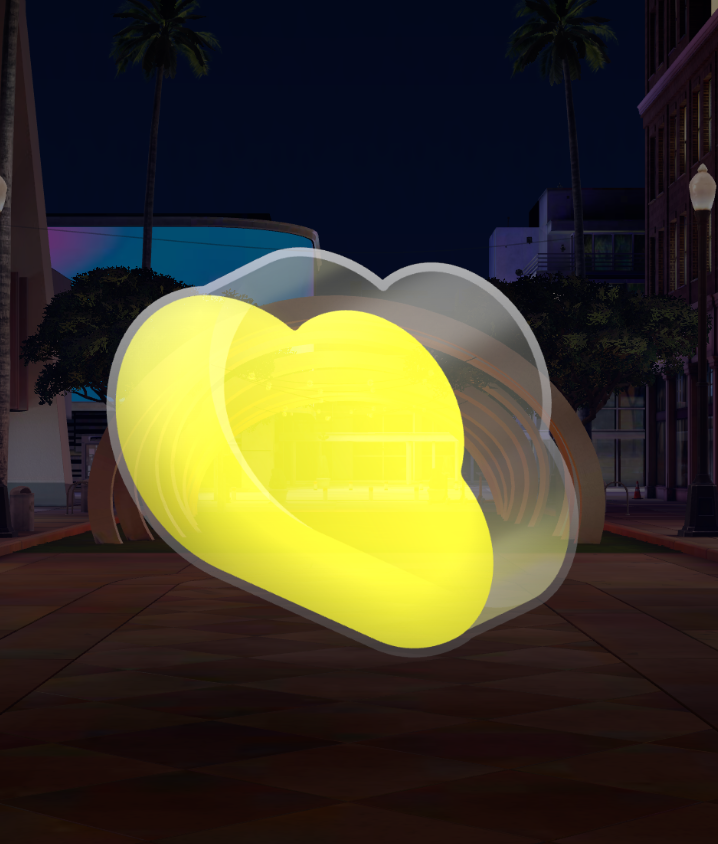
Upon running this Lens, you should see the downloaded image appear on your Image component.
From here you can explore more storage features like uploading, or move on to trying Realtime.
To see the full documentation for all you can do with Snap Cloud, refer to the Snap Cloud documentation site.