ScrollBar
This component is a helper component for ScrollWindow. It requires both a ScrollWindow and a Slider. A useful setup is having a "Scroll Parent" object with two objects as children: an object with a ScrollWindow and an object with the ScrollBar and a Slider.
Component Breakdown
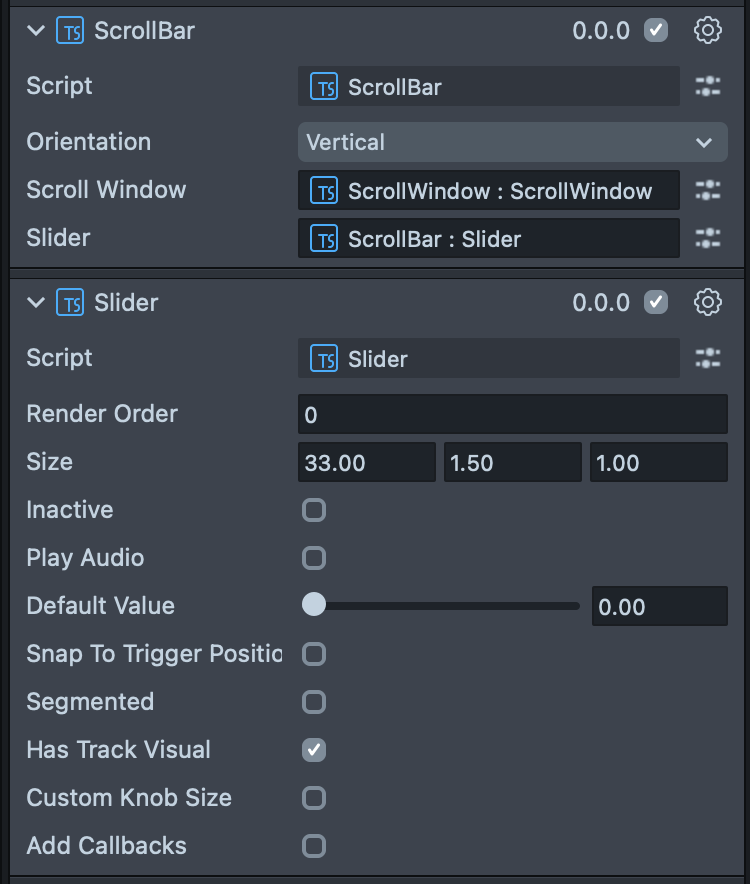
Orientation | Sets which direction should the ScrollBar scroll. |
ScrollWindow | Sets which ScrollWindow does the ScrollBar control. |
Slider | Sets which Slider will become the scroll bar. |
Code Example
- TypeScript
import { ScrollWindow } from 'SpectaclesUIKit.lspkg/Scripts/Components/ScrollWindow/ScrollWindow';
import { Slider } from 'SpectaclesUIKit.lspkg/Scripts/Components/Slider/Slider';
import { ScrollBar } from 'SpectaclesUIKit.lspkg/Scripts/ScrollBar';

/*
 * Example script for the ScrollBar component.
 * It creates a ScrollWindow and Slider.
 * And then creates a ScrollBar and attaches the ScrollWindow and Slider.
 */

@component
export class ExampleScrollBarScript extends BaseScriptComponent {
  onAwake() {
    this.createContent();
    const scrollWindowObject = global.scene.createSceneObject('ScrollWindow');
    scrollWindowObject.setParent(this.sceneObject);
    const scrollWindow = scrollWindowObject.createComponent(
      ScrollWindow.getTypeName()
    );
    scrollWindow.initialize();
    scrollWindow.setWindowSize(new vec2(15, 20));
    scrollWindow.setScrollDimensions(new vec2(15, 80));
    scrollWindow.vertical = true;
    scrollWindow.horizontal = false;

    const scrollBarObject = global.scene.createSceneObject('ScrollBar');
    scrollBarObject.setParent(this.sceneObject);
    const scrollBar = scrollBarObject.createComponent(ScrollBar.getTypeName());
    const slider = scrollBarObject.createComponent(Slider.getTypeName());

    scrollBar.scrollWindow = scrollWindow;
    scrollBar.slider = slider;
    scrollBar.initialize();
  }

  createContent() {
    const child = global.scene.createSceneObject('Child');
    child.setParent(this.sceneObject);
    const text = child.createComponent('Text');
    text.text =
      'Lorem ipsum dolor sit amet, consectetur adipiscing elit. Sed do eiusmod tempor incididunt ut labore et dolore magna aliqua. \n\n';
    text.text = text.text.repeat(5);
    text.size = 60;
    text.horizontalOverflow = HorizontalOverflow.Wrap;
    text.horizontalAlignment = HorizontalAlignment.Left;
    const screenTransform = child.createComponent('ScreenTransform');
    screenTransform.anchors = Rect.create(-1, 1, -1, 1);
    screenTransform.offsets.setSize(new vec2(12, 20));
    screenTransform.position = new vec3(0, 0, 0);
  }
}
-->
Was this page helpful?