ScrollWindow
A basic scrolling interaction solution for Spectacles. Children of this component's SceneObject will be masked into windowSize and scrollable by scrollDimensions. By default, it will start centered on scrollDimensions.
Component Breakdown
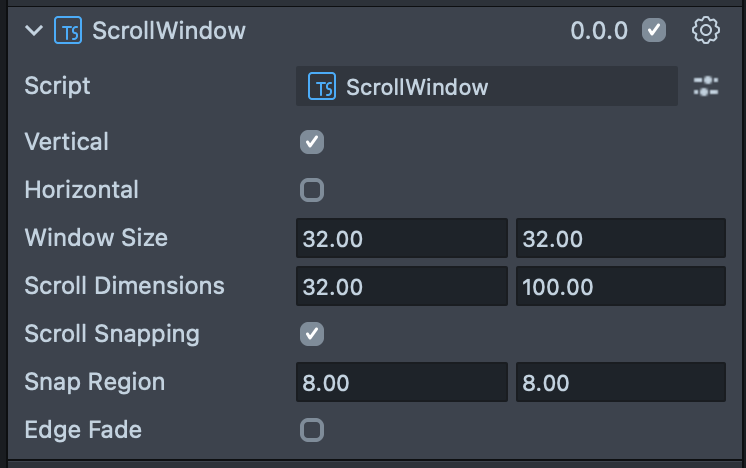
Vertical | Enables vertical scrolling. |
Horizontal | Enables horizontal scrolling. |
Window Size | Defines the size of the viewport in local space centimeters. |
Scroll Dimensions | Defines the size of the scrollable area. |
Scroll Snapping | Enables ScrollWindow's scroll snapping behavior. If snapping is enabled it will add "sticking points" that the ScrollWindow will automatically scroll and stop on when an interaction ends. |
Snap Region | (only visible when Scroll Snapping is enabled) Defines the regions that the ScrollWindow will snap to when using scroll snapping. |
Edge Fade | Adds an automatic simple black-color-fade around the edges of the frame. |
Code Example
- TypeScript
- JavaScript
import { ScrollWindow } from 'SpectaclesUIKit.lspkg/Scripts/Components/ScrollWindow/ScrollWindow';

/*
 * Example script for the ScrollWindow component.
 * It creates a scroll window and sets its size and style.
 * It also creates a text object and sets its size and style.
 */

@component
export class ExampleScrollWindowScript extends BaseScriptComponent {
  onAwake() {
    this.createContent();
    const scrollWindow = this.sceneObject.createComponent(
      ScrollWindow.getTypeName()
    );
    scrollWindow.initialize();
    scrollWindow.setWindowSize(new vec2(15, 20));
    scrollWindow.setScrollDimensions(new vec2(15, 80));
    scrollWindow.vertical = true;
    scrollWindow.horizontal = false;
  }

  createContent() {
    const child = global.scene.createSceneObject('Child');
    child.setParent(this.sceneObject);
    const text = child.createComponent('Text');
    text.text =
      'Lorem ipsum dolor sit amet, consectetur adipiscing elit. Sed do eiusmod tempor incididunt ut labore et dolore magna aliqua. \n\n';
    text.text = text.text.repeat(5);
    text.size = 60;
    text.horizontalOverflow = HorizontalOverflow.Wrap;
    text.horizontalAlignment = HorizontalAlignment.Left;
    const screenTransform = child.createComponent('ScreenTransform');
    screenTransform.anchors = Rect.create(-1, 1, -1, 1);
    screenTransform.offsets.setSize(new vec2(12, 20));
    screenTransform.position = new vec3(0, 0, 0);
  }
}
// Import required modules
const ScrollWindow =
  require('SpectaclesUIKit.lspkg/Scripts/Components/ScrollWindow/ScrollWindow').ScrollWindow;

/**
 * Example script for the ScrollWindow component.
 * It creates a scroll window and sets its size and style.
 * It also creates a text object and sets its size and style.
 */

function onAwake() {
  createContent();
  const scrollWindow = script.sceneObject.createComponent(
    ScrollWindow.getTypeName()
  );
  scrollWindow.initialize();
  scrollWindow.setWindowSize(new vec2(15, 20));
  scrollWindow.setScrollDimensions(new vec2(15, 80));
  scrollWindow.vertical = true;
  scrollWindow.horizontal = false;
}

function createContent() {
  const child = global.scene.createSceneObject('Child');
  child.setParent(script.sceneObject);
  const text = child.createComponent('Text');
  text.text =
    'Lorem ipsum dolor sit amet, consectetur adipiscing elit. Sed do eiusmod tempor incididunt ut labore et dolore magna aliqua. \n\n';
  text.text = text.text.repeat(5);
  text.size = 60;
  text.horizontalOverflow = HorizontalOverflow.Wrap;
  text.horizontalAlignment = HorizontalAlignment.Left;
  const screenTransform = child.createComponent('ScreenTransform');
  screenTransform.anchors = Rect.create(-1, 1, -1, 1);
  screenTransform.offsets.setSize(new vec2(12, 20));
  screenTransform.position = new vec3(0, 0, 0);
}

// Start the script
onAwake();
Was this page helpful?